July 29, 2026
How to Build a Freelance Lead Tracker That Helps You Reply Faster
Build a freelance lead tracker with fields for source, role, budget, freshness, fit, contact method, next action, deadline, status, and outcome. Review fresh leads daily, prioritize high-fit opportunities, save the original source link, and use a simple follow-up rhythm so good projects do not disappear in browser tabs.
What is a freelance lead tracker?
A freelance lead tracker is a simple system for collecting, scoring, following up on, and reviewing potential work opportunities. It can live in Google Sheets, Notion, Airtable, Trello, or any tool you will actually open every day.
The goal is not to build a complicated CRM. The goal is to answer five questions quickly:
- Where did this lead come from?
- Is it a good fit for my skills and availability?
- How urgent is it?
- What should I do next?
- Did it turn into work, a conversation, or a dead end?
If you currently find freelance leads across Reddit, Upwork, Fiverr, Contra, LinkedIn, public communities, newsletters, Discord groups, or personal referrals, a tracker helps you stop losing good opportunities in screenshots, bookmarks, DMs, and open tabs.
Why freelancers need a lead tracker
Freelance work often rewards speed and consistency. Many public opportunities get the most attention soon after they are posted, especially when the client has a clear problem, budget, and deadline.
A tracker helps you:
- respond faster to fresh opportunities,
- avoid applying twice to the same lead,
- compare sources by quality, not just volume,
- remember when to follow up,
- see which niches and platforms actually convert,
- build a repeatable daily prospecting habit.
This is where a discovery layer can help. Sidequestboard can be used before your tracker as a calmer feed for fresh public opportunities, so you spend less time checking separate communities and more time evaluating and replying to the best leads.
See fresh gigs on Sidequestboard
What should you track for each freelance lead?
Start with a compact set of fields. Too many columns make the tracker harder to maintain; too few make it less useful.
| Field | What to record | Why it matters |
|---|---|---|
| Date found | The day you found the lead | Helps you measure freshness and response speed |
| Source | Reddit, Upwork, referral, newsletter, community, etc. | Shows which channels produce useful leads |
| Original link | Link to the post, listing, or message | Keeps the source easy to verify |
| Client or company | Name if available | Helps avoid duplicate outreach |
| Role or project type | Developer, designer, writer, VA, editor, consultant, etc. | Makes filtering easier |
| Budget or rate | Listed budget, hourly range, or unknown | Helps you qualify before replying |
| Deadline or urgency | Application deadline, start date, or “ASAP” | Helps prioritize fast-moving leads |
| Fit score | 1–5 or low/medium/high | Forces a quick quality judgment |
| Contact method | Email, form, DM, platform proposal, application link | Prevents confusion later |
| Next action | Draft reply, send portfolio, follow up, archive | Turns a lead into a task |
| Status | New, qualified, contacted, follow-up, won, lost, archived | Keeps the pipeline clean |
| Outcome | Call booked, proposal sent, no reply, hired, rejected | Helps you learn from your efforts |
| Notes | Key client pain, personalization angle, red flags | Improves reply quality |
If you want the simplest possible version, use only these columns:
- Date found
- Source
- Link
- Project type
- Budget
- Fit
- Next action
- Status
- Outcome
That is enough to start.
Which tool should you use: Sheets, Notion, Airtable, or Trello?
Choose the tool based on how you already work.
Google Sheets
Best if you want speed, filters, sorting, and easy duplication.
Use Google Sheets if you like:
- rows and columns,
- quick filtering by source or status,
- simple formulas,
- a low-maintenance setup.
A spreadsheet is often the best first tracker because it is hard to overbuild.
Notion
Best if you want a lead database connected to notes, templates, portfolio snippets, and outreach drafts.
Use Notion if you like:
- database views,
- kanban boards,
- saved reply templates,
- pages for each client or niche.
Notion is useful when your process includes research notes and personalized pitch drafts.
Airtable
Best if you want a more structured database with forms, linked records, and multiple views.
Use Airtable if you want:
- more powerful filtering,
- separate tables for clients, sources, and projects,
- form-based lead entry,
- richer database features than a spreadsheet.
Trello
Best if you think visually and want a simple pipeline board.
A Trello setup could use columns like:
- New leads
- Qualified
- Replied
- Follow up
- Call booked
- Won
- Lost
Trello is easy to maintain, but it is weaker for source analysis unless you are disciplined with labels and notes.
How do you build the tracker step by step?
Step 1: Choose one main workspace
Do not split your leads across five tools. Pick one home for the tracker.
A good rule:
- If you are starting today, use Google Sheets.
- If you already run your freelance business in Notion, use Notion.
- If you already manage sales or content pipelines in Airtable or Trello, use that.
The best tracker is the one you will update daily.
Step 2: Create your core columns
Add these columns first:
- Date found
- Source
- Original link
- Client/company
- Project type
- Budget/rate
- Freshness
- Fit score
- Contact method
- Next action
- Follow-up date
- Status
- Outcome
- Notes
For “freshness,” use simple labels:
- Same day
- 1–2 days old
- 3–7 days old
- Older than 7 days
- Unknown
Freshness is useful because public freelance leads can move quickly. A same-day post with a clear budget may deserve attention before a week-old listing with vague details.
Step 3: Define your status labels
Use status labels that match your real workflow.
Recommended statuses:
- New
- Qualified
- Contacted
- Follow-up
- Call booked
- Proposal sent
- Won
- Lost
- Archived
Avoid having too many statuses. If every lead needs a custom status, your tracker will become harder to scan.
Step 4: Add a fit score
A fit score helps you avoid treating every lead equally.
Use a 1–5 score:
- 5 = strong match, clear problem, good budget, relevant proof available
- 4 = good match, worth replying soon
- 3 = possible match, needs more context
- 2 = weak fit or unclear scope
- 1 = not worth pursuing
You can also use low, medium, and high if that feels easier.
Score based on:
- skill fit,
- budget fit,
- timeline,
- client clarity,
- portfolio relevance,
- likelihood of a thoughtful response,
- red flags.
Step 5: Save the original source link
Always save the original listing, post, or message. This matters because freelance leads often get edited, removed, filled, or buried.
Your tracker should never say only “Reddit post” or “Upwork job.” Save the exact URL whenever possible.
Step 6: Create daily and weekly views
If your tool supports views or filters, create these:
- New leads found today
- High-fit leads
- Leads needing reply
- Follow-ups due today
- Calls booked
- Won/lost by source
A tracker becomes valuable when it tells you what to do next, not just what you found.
Where should freelance leads come from?
Your tracker can include any source where you realistically find work. Common sources include:
- Reddit communities such as r/forhire, r/HireaWriter, r/designjobs, and r/WorkOnline,
- freelance marketplaces such as Upwork, Fiverr, Contra, PeoplePerHour, and Toptal,
- LinkedIn posts and job listings,
- X/Twitter posts,
- Discord and Slack communities,
- niche job boards,
- newsletters,
- creator communities,
- alumni groups,
- referrals,
- inbound website or portfolio inquiries.
When using marketplaces, always verify current platform rules, service fees, payment protections, and contact policies directly on the official platform before pricing a project or moving a conversation. Fee structures and terms can change.
When using Reddit or other communities, check each community’s rules before posting or replying. Subscriber counts, posting rules, and moderation policies can change over time.
How should you prioritize freelance leads?
Use a simple scoring system so you do not waste your best energy on poor-fit leads.
High priority
Reply quickly when the lead has:
- a clear problem,
- a project type you already understand,
- a realistic budget or strong business context,
- a recent post date,
- a contact method you can use now,
- a portfolio match,
- few obvious red flags.
Medium priority
Consider replying when:
- the scope is interesting but unclear,
- the budget is missing,
- the client seems legitimate but vague,
- you would need to ask qualifying questions,
- the project could become valuable if scoped well.
Low priority
Archive or deprioritize leads when:
- the budget is far below your minimum,
- the scope is unrealistic,
- the client asks for unpaid custom work,
- the post is old and likely filled,
- the instructions are confusing or contradictory,
- the work is outside your positioning.
Your tracker should help you protect attention. Not every lead deserves a reply.
What rate information should you track?
Track the budget or rate exactly as written, but do not treat public ranges as universal pricing rules. Freelance rates vary heavily by market, geography, experience, rights, urgency, niche, client type, and scope.
Useful budget fields include:
- Posted budget
- Hourly or fixed
- Your estimated minimum
- Questions needed before quoting
- Pricing risk
For example:
| Lead type | What to check before replying |
|---|---|
| Writing | Word count, research depth, interviews, byline, rights, revision expectations |
| Design | Deliverables, file formats, revisions, brand assets, commercial usage |
| Development | Stack, timeline, existing code quality, deployment responsibility, maintenance needs |
| Video editing | Length, source footage quality, captions, revisions, motion graphics, turnaround |
| VA/admin | Hours, timezone, tools, response expectations, data sensitivity |
| Consulting | Business value, decision-maker access, deliverables, implementation responsibility |
Use budget data as a screening tool, not as your only decision factor.
What should your daily lead-tracking routine look like?
A practical daily routine can take 20–45 minutes.
1. Check your lead sources
Open your main sources or use a discovery feed to reduce tab switching. Save only leads that have a realistic chance of being worth your time.
2. Add qualified leads to the tracker
Do not add every post you see. Add leads that pass a minimum threshold:
- relevant skill area,
- credible client or source,
- recent enough to act on,
- contact method available,
- no obvious dealbreaker.
3. Score each lead
Give each lead a fit score before writing a reply. This prevents low-quality opportunities from draining your best writing time.
4. Reply to the best leads first
Start with leads that are fresh, high-fit, and easy to personalize.
5. Set follow-up dates
If a lead is important, add a follow-up date immediately. Without a date, “follow up later” usually becomes “forget forever.”
6. Update outcomes
At the end of the day, update statuses:
- contacted,
- follow-up needed,
- call booked,
- archived,
- lost,
- won.
The tracker only works if it reflects reality.
What follow-up workflow should freelancers use?
A simple follow-up rhythm is enough for most freelance leads.
For direct email or contact form leads
Use this pattern:
- Day 0: Send a personalized reply
- Day 2–3: Send a short follow-up if there is no response
- Day 7: Send one final helpful follow-up or archive
For marketplace leads
Follow the platform’s rules and messaging norms. Some marketplaces restrict contact methods, off-platform communication, or repeated messages. Verify current rules on the official platform.
For Reddit, Discord, or community leads
Be respectful and concise. Many community leads are public and receive multiple responses.
A simple follow-up note could be:
Hi [Name], just checking whether you are still looking for help with [project]. I had one relevant idea: [specific suggestion]. Happy to send examples or answer questions if useful.
Do not chase every lead forever. A tracker is useful partly because it helps you archive with confidence.
What should a good first reply include?
Your first reply should be specific enough to stand out, but short enough to read quickly.
Include:
- the problem you noticed,
- your relevant experience,
- one proof point,
- one useful question,
- a clear next step.
Example:
Hi [Name], I saw you are looking for help with [specific project]. I recently worked on [similar result or project], so this caught my eye. Based on your post, the first thing I would clarify is [specific question]. If helpful, I can send 2–3 relevant examples and a quick suggested approach.
Avoid sending the same generic pitch to every lead. Your tracker’s notes field should help you personalize faster.
Example tracker workflow for a freelance developer
A freelance developer might track leads from Reddit, niche job boards, GitHub-related communities, referrals, and marketplaces.
Useful extra fields:
- Tech stack
- Codebase status
- Deployment needs
- Maintenance expectations
- Urgency
- Existing team or solo client
A high-fit developer lead might look like this:
| Field | Example |
|---|---|
| Source | Public community post |
| Project type | React bug fixes and performance cleanup |
| Freshness | Same day |
| Budget | Listed as fixed budget |
| Fit score | 5 |
| Next action | Reply with relevant performance examples |
| Status | Qualified |
The developer should reply quickly if they have proof, ask about the current bottleneck, and avoid quoting before understanding scope.
Example tracker workflow for a UI designer
A UI designer may collect leads from design job boards, founder communities, startup groups, referrals, and social posts.
Useful extra fields:
- Deliverables
- Design system required
- Figma files available
- Brand assets available
- Revision expectations
- Commercial usage
A strong design lead might mention a landing page redesign, a SaaS onboarding flow, or a pitch deck with a clear deadline.
The tracker helps the designer separate “needs a designer” from “needs unlimited work for a tiny budget.”
Example tracker workflow for a content writer
A content writer might monitor r/HireaWriter, content marketing communities, newsletters, founder groups, editorial job boards, and referrals.
Useful extra fields:
- Topic niche
- Word count
- Research depth
- Interviews required
- SEO brief provided
- Byline or ghostwriting
- Rights and usage
A good writing lead is not just “paid writing.” It should match your niche, quality level, research ability, and desired client type.
The tracker should help answer:
- Which niches lead to calls?
- Which sources create paid work?
- Which clients respond to personalized pitches?
- Which project types are too much work for the budget?
How do you measure whether your tracker is working?
Review your tracker once a week.
Look at:
- number of leads saved,
- number of qualified leads,
- number of replies sent,
- response rate,
- calls booked,
- proposals sent,
- projects won,
- best sources,
- worst sources,
- average time from lead found to reply sent.
A simple weekly review can reveal that one source creates lots of noise while another creates fewer but better opportunities.
Ask:
- Which source produced the most high-fit leads?
- Which source produced actual conversations?
- Which leads did I reply to too late?
- Which types of posts should I ignore next week?
- What reply template worked best?
If your tracker only grows but never gets reviewed, it becomes a graveyard. The weekly review turns it into a learning system.
Common mistakes to avoid
Tracking too many weak leads
Do not save everything. A tracker full of bad leads makes good leads harder to see.
Forgetting the next action
Every active lead should have a next action. If there is no next action, archive it or mark it as waiting.
Ignoring freshness
A great opportunity found too late may not be worth the same effort as a good opportunity found today.
Not recording outcomes
If you do not track outcomes, you cannot tell which sources, niches, or pitches work.
Overbuilding the system
You do not need automations, dashboards, and complex scoring on day one. Start simple, then improve after you have real data.
A simple freelance lead tracker template
Copy these columns into your tool of choice:
| Column | Example |
|---|---|
| Date found | 2026-07-29 |
| Source | Reddit, referral, marketplace, newsletter |
| Original link | URL |
| Client/company | Name or unknown |
| Project type | Landing page design, blog writing, API fix |
| Budget/rate | As posted or unknown |
| Freshness | Same day, 1–2 days, 3–7 days, older |
| Fit score | 1–5 |
| Contact method | Email, DM, form, platform proposal |
| Next action | Reply, research, follow up, archive |
| Follow-up date | Date |
| Status | New, qualified, contacted, follow-up, won, lost |
| Outcome | No reply, call booked, hired, rejected |
| Notes | Personalization angle, red flags, questions |
Start with this, then add fields only when you repeatedly need them.
How Sidequestboard fits into this workflow
A lead tracker helps you manage opportunities after you find them. The harder part is often finding fresh, relevant public opportunities without spending your morning bouncing between tabs.
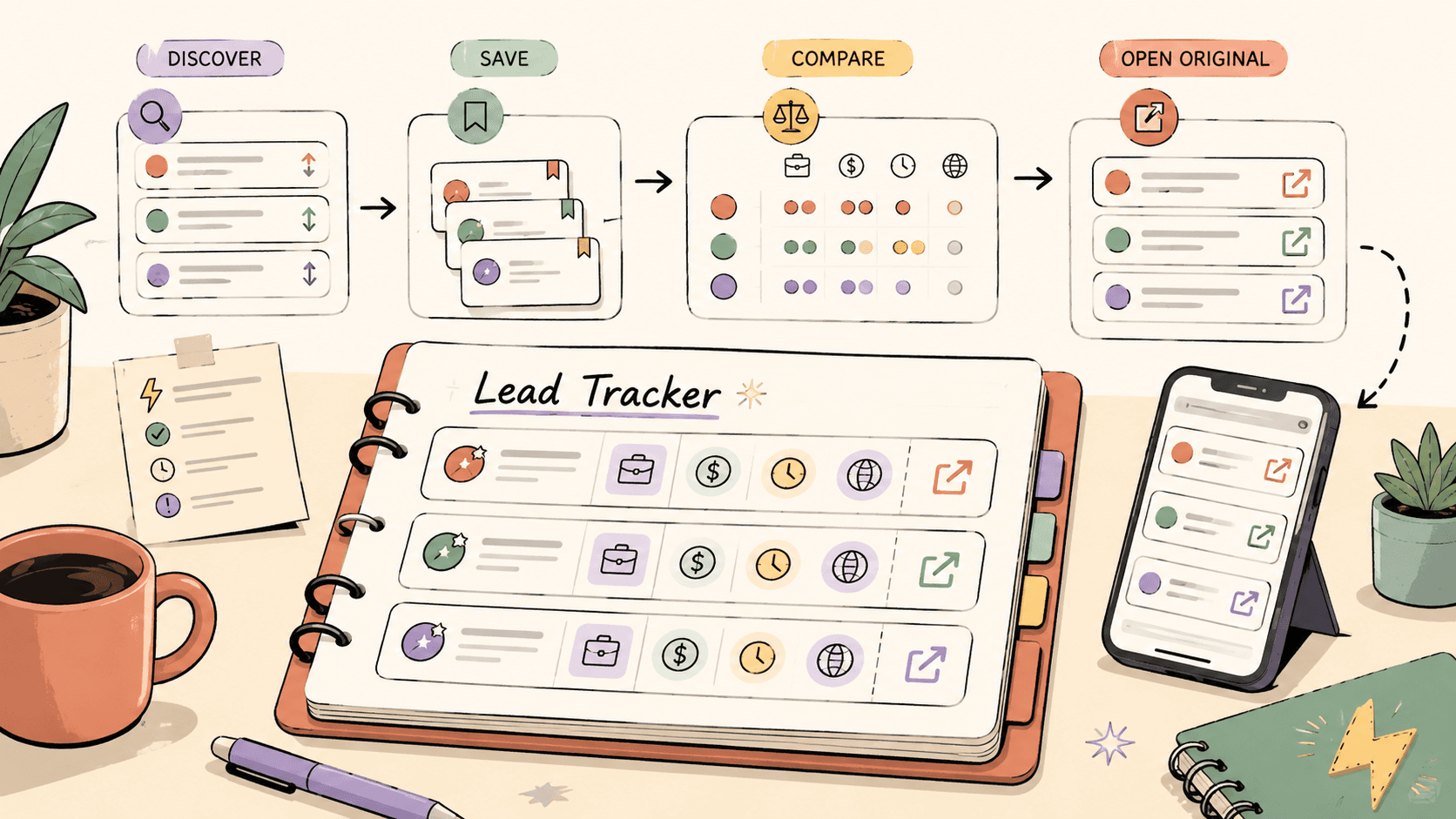
Sidequestboard can sit at the top of the workflow:
- Discover fresh public opportunities in a cleaner feed.
- Open and verify the original source.
- Save the best-fit leads.
- Add qualified opportunities to your tracker.
- Reply quickly with a personalized message.
- Review results at the end of the week.
That keeps your tracker focused on leads worth action, not every post you happened to scroll past.
Final checklist
Before you call your tracker done, make sure it can answer these questions:
- What are my best leads today?
- Which leads need a reply?
- Which leads need a follow-up?
- Which sources create qualified opportunities?
- Which leads turned into calls, proposals, or paid work?
- Which sources should I stop checking so often?
If your tracker answers those questions, it is doing its job.