July 29, 2026
How to Build a Repeatable System for Contract Leads
Build a repeatable contract lead system by choosing a small set of trusted sources, checking them on a fixed schedule, saving only qualified leads, tracking every opportunity in one pipeline, and replying quickly with specific proof. The goal is to spend less time searching and more time pitching well-fit contracts.
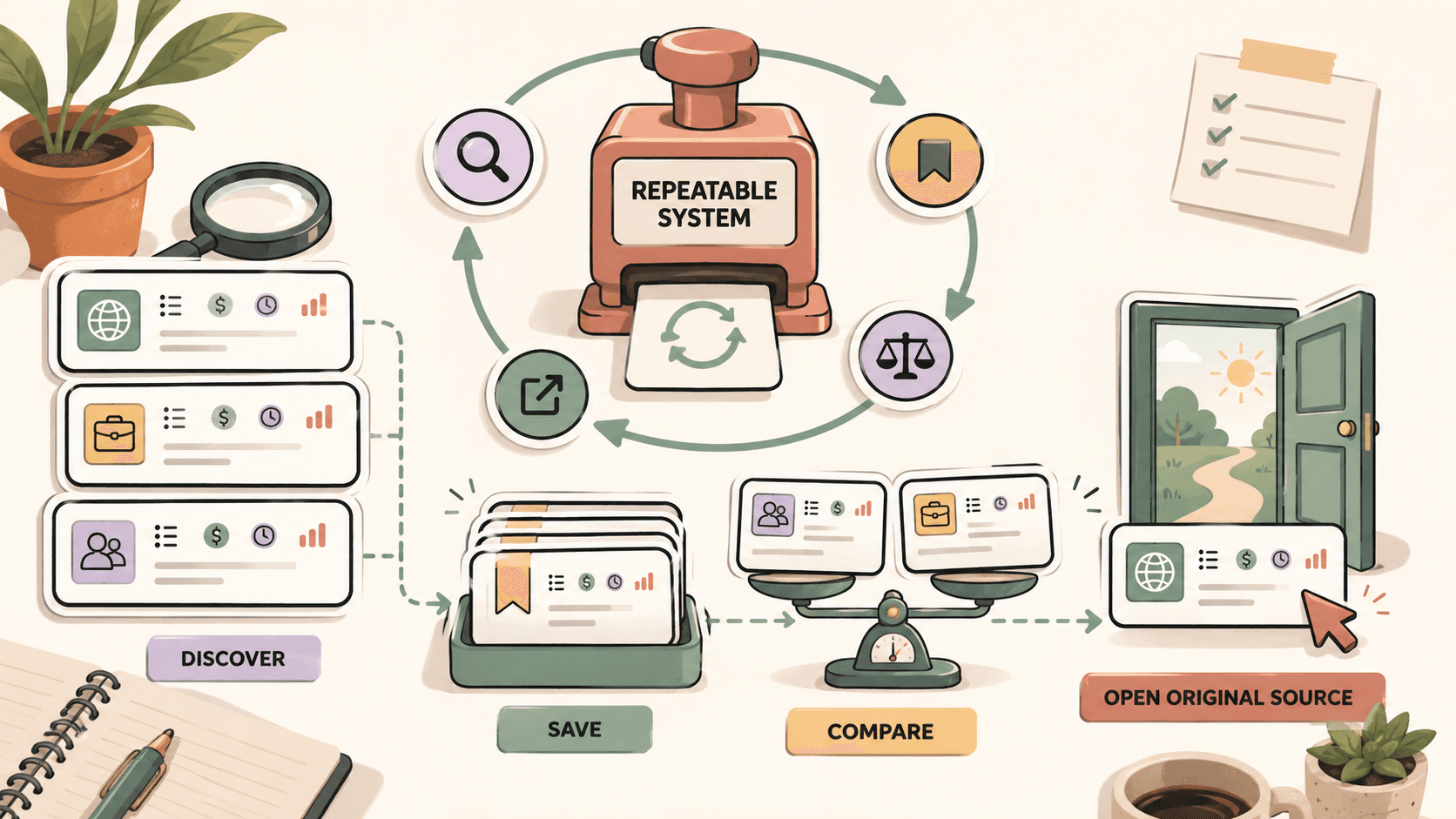
What is a contract lead system?
A contract lead system is a repeatable workflow for finding, qualifying, saving, tracking, and responding to freelance or contract opportunities.
Instead of opening random tabs whenever work feels slow, you define:
- where you look for leads,
- when you check those sources,
- what makes a lead worth pursuing,
- how you track each opportunity,
- how quickly you respond,
- when you follow up,
- how you review what is working.
The system matters because contract work is often time-sensitive. If a promising client posts in a busy community or marketplace, the best replies often arrive early, show relevant proof, and make the next step easy.
Step 1: Choose 5 to 8 contract lead sources
Start with a small source list. Too many sources create noise; too few sources limit your chances. A practical starting point is 5 to 8 places you can check consistently.
Good source categories include:
- public communities,
- freelance marketplaces,
- niche job boards,
- social platforms,
- agency or startup career pages,
- referral partners,
- past client networks.
Public communities
Public communities can surface urgent, informal, and niche contract needs. Examples include Reddit communities such as r/forhire, r/WorkOnline, r/HireaWriter, r/designjobs, and other role-specific subreddits.
Before replying, read each community's rules. Some communities require specific title formats, rate details, portfolio links, or restrictions on direct messages. Do not assume every post is legitimate, and avoid sending personal information or unpaid custom work before you verify the client.
Freelance marketplaces
Marketplaces such as Upwork, Fiverr, Contra, PeoplePerHour, Toptal, and similar platforms can be useful because clients are already looking for help. They also have different fee structures, application rules, ranking systems, payment protections, and messaging limits.
Check each platform's current service fees, payment terms, and client policies before pricing your work. Marketplace fees and rules can change, and they affect your net rate.
For Fiverr specifically, use whatever matching, briefs, requests, or project discovery features are currently available in your account rather than relying on outdated feature names.
Niche job boards
Niche job boards can work well for specialized services such as writing, design, development, marketing, video, operations, AI automation, data analysis, or customer support.
Search for boards that match your service and client type. For example:
- remote marketing contract boards,
- startup design job boards,
- technical writing job boards,
- Webflow or Shopify expert boards,
- fractional operations or finance boards.
Social platforms and public posts
Some contract opportunities appear as public posts on social platforms before they reach formal job boards. Use search phrases such as:
looking for freelance designer,need a contractor for,hiring freelance writer,looking for Webflow developer,need help with email marketing,contract role remote.
Sidequestboard can help here by giving you a cleaner feed of fresh public opportunities from communities and social platforms, so your source-checking routine does not become a pile of tabs.
Track fresh opportunities on Sidequestboard
Step 2: Define what counts as a qualified lead
A lead is not qualified just because it mentions your skill. A qualified contract lead should match enough of your criteria to be worth a reply.
Use a simple qualification checklist:
- Service fit: Do they need something you actually provide?
- Client fit: Is the client type close to your target market?
- Budget fit: Is there a posted budget, rate range, or enough context to estimate viability?
- Timing fit: Do they need help soon enough to justify a fast reply?
- Scope clarity: Is the problem specific enough to respond intelligently?
- Trust signals: Is there a real company, public profile, payment history, or credible context?
- Competition level: Is the post fresh enough that your reply can still stand out?
- Portfolio fit: Can you show relevant proof quickly?
If a post fails most of these checks, skip it. A repeatable system is not about replying to everything. It is about replying consistently to the right things.
Step 3: Build a simple lead tracker
Your tracker can live in Notion, Airtable, Trello, Google Sheets, or a lightweight CRM. The tool matters less than the habit.
Track these fields:
| Field | Why it matters |
|---|---|
| Lead name | Short description of the opportunity |
| Source | Where you found it |
| Original link | So you can return to the post |
| Client/company | Who posted it, if known |
| Service needed | Writing, design, development, marketing, etc. |
| Estimated value | Your rough deal size or rate fit |
| Status | Saved, replied, follow-up, call booked, won, lost |
| Reply date | When you contacted them |
| Follow-up date | When to check back |
| Notes | Context, risks, proof to mention |
A sample row might look like this:
| Lead name | Source | Service | Status | Follow-up | Notes |
|---|---|---|---|---|---|
| SaaS landing page rewrite | Conversion copywriting | Replied | Friday | Mentioned trial signup page and SaaS case study |
Keep the statuses simple at first:
- Saved
- Qualified
- Replied
- Follow-up due
- Call booked
- Proposal sent
- Won
- Lost
If your tracker takes more than a minute to update, it is probably too complex.
Step 4: Create saved searches and filters
Saved searches make your system repeatable. Instead of typing new searches every day, create reusable searches around your services, client types, and buying-intent phrases.
Search by service
Examples:
freelance email marketer neededhiring contract designerneed Shopify developerlooking for technical writerneed landing page copywritercontract data analyst remote
Search by pain point
Examples:
website redesign helpneed help with cold emaillooking for someone to fix conversion rateneed automation experthelp migrating to Webflow
Search by client type
Examples:
startup hiring freelanceragency needs contractorfounder looking for designerSaaS company freelance writerecommerce brand needs developer
Use search operators when helpful
Google search operators can help you find public opportunities across communities and boards. For example:
site:reddit.com/r/forhire "hiring" "designer"site:reddit.com "looking for" "freelance writer"site:twitter.com "need a" "Webflow developer""contract" "remote" "email marketing"
Search operators are not perfect, and platforms change how public posts appear in search. Treat them as one input, not your entire lead system.
Step 5: Set a daily lead routine
A contract lead system only works if it becomes a habit. Use a fixed time block rather than checking all day.
A practical daily routine:
20 minutes: scan sources
Open your chosen sources, saved searches, and opportunity feed. Look only for fresh, relevant posts. Do not start writing long replies yet.
10 minutes: qualify and save
Save the leads that pass your checklist. Add each one to your tracker with the original link, service type, status, and quick notes.
30 to 60 minutes: write replies
Respond to the best leads first. Your reply should be specific, short, and proof-driven.
10 minutes: update statuses
Mark which leads you replied to, which need follow-up, and which should be archived.
If you only have 30 minutes total, reduce the routine to:
- scan,
- save three strong leads,
- send one excellent reply.
One thoughtful response to a strong-fit lead is usually more valuable than ten generic replies to weak-fit posts.
Step 6: Reply with speed and specificity
Fast does not mean careless. A good contract reply proves that you read the post and can solve the problem.
Use this structure:
- Acknowledge the specific need.
- Show one relevant proof point.
- Offer a clear next step.
- Keep it easy to answer.
Example reply for a writing lead
Hey — I saw you are looking for help rewriting a SaaS landing page before a launch. I work on conversion-focused website copy for software companies, especially pages where the offer is strong but the messaging is unclear.
A relevant example: I recently helped restructure a trial signup page around customer pain points, objections, and clearer feature framing.
If useful, I can take a quick look at your current page and send back 2 or 3 high-level opportunities before we discuss scope. What timeline are you working toward?
Example reply for a design lead
Hi — your post about needing a product designer for dashboard cleanup sounds close to projects I take on. I focus on simplifying dense B2B interfaces and making key workflows easier to understand.
Here is a relevant portfolio piece: [link].
If the role is still open, I can send a short note on how I would approach the first pass and what I would need from your team.
Example reply for a development lead
Hey — I saw you need help fixing performance issues on a Shopify site. I have handled similar frontend cleanup work, including theme bloat, app conflicts, and Core Web Vitals improvements.
If you can share the store URL and the main issue you are seeing, I can confirm whether it looks like a good fit and suggest the next step.
Avoid replies that only say “I’m interested” or “DM me.” The client should immediately understand why you are relevant.
Step 7: Follow up without sounding desperate
Many contractors lose good opportunities because they never follow up. A simple follow-up is enough.
Use this timing:
- Follow up after 2 to 4 business days if the post is still relevant.
- Follow up once, maybe twice for high-value leads.
- Stop if the client says the role is filled or does not respond after reasonable attempts.
Example follow-up:
Hey — just checking back on this. I’m still interested if you are reviewing contractors for the project. Happy to send a short approach or answer any questions about fit.
For higher-value opportunities, add something useful:
I had one extra thought after looking at the brief: before redesigning the full page, I would first clarify the main conversion action and remove any sections that do not support it. That may make the scope smaller and faster.
The goal is to be helpful, not pushy.
Step 8: Review your system weekly
A repeatable system should improve over time. Once a week, review your tracker and ask:
- Which sources produced the most qualified leads?
- Which sources produced noise?
- Which replies got responses?
- Which service keywords performed best?
- Which client types had realistic budgets?
- Which leads moved to calls or proposals?
- Which opportunities were not worth the time?
Then adjust your source list. Remove low-quality sources and double down on the ones producing replies.
Track simple metrics:
| Metric | What it tells you |
|---|---|
| Leads saved | Whether your sources are producing enough volume |
| Replies sent | Whether you are acting consistently |
| Reply rate | Whether your targeting and message are working |
| Calls booked | Whether leads are commercially serious |
| Proposals sent | Whether calls are turning into real opportunities |
| Contracts won | Whether the whole system is producing revenue |
You do not need perfect data. You need enough signal to make better decisions each week.
How to avoid common contract lead mistakes
Mistake 1: Checking too many places
More sources can make you feel productive while reducing your response quality. Start narrow. Add sources only when you can manage them consistently.
Mistake 2: Replying to every post
Bad-fit leads drain time. If the budget is unclear, the scope is vague, the client seems risky, or the post is old and crowded, be selective.
Mistake 3: Using the same pitch everywhere
Templates are useful, but every reply should include details from the actual post. Specificity is what separates a serious contractor from a mass responder.
Mistake 4: Forgetting net rate
If a marketplace deducts fees or delays payouts, your headline rate is not your take-home rate. Check current platform terms and price accordingly.
Mistake 5: Not saving original links
If you cannot find the original post later, you cannot follow up properly. Save the source link every time.
Sidequestboard is useful as the first step in this workflow: scan fresh public opportunities, save the ones that match your criteria, then open the original source to respond directly.
A simple weekly contract lead system you can copy
Use this if you want a ready-made routine.
Monday
- Review last week's tracker.
- Remove poor sources.
- Add or adjust saved searches.
- Send follow-ups from the previous week.
Tuesday to Thursday
- Scan sources for 20 minutes.
- Save qualified leads.
- Send replies to the best-fit opportunities.
- Update statuses.
Friday
- Follow up on earlier replies.
- Review response rates.
- Note which sources produced the best leads.
- Prepare next week's search terms.
Daily minimum
If you are busy, keep the minimum habit small:
- save one qualified lead,
- send one specific reply,
- update your tracker.
That is enough to keep your pipeline moving.
What should your contract lead stack include?
A lean stack is better than a complex one.
You need:
- Discovery: communities, public posts, marketplaces, job boards, and curated feeds.
- Saving: a place to save interesting opportunities quickly.
- Tracking: a spreadsheet, board, or CRM.
- Proof: portfolio links, case studies, testimonials, or relevant samples.
- Reply templates: flexible starting points you customize for each lead.
- Calendar: follow-up reminders and call booking.
Do not buy tools to fix an unclear offer. If you are not getting replies, first improve your targeting, proof, and message.
When should you change your system?
Change your system when the data says it is not working.
Signs you need better sources:
- You save many leads but few are relevant.
- Most posts are too old by the time you see them.
- Budgets rarely match your rates.
- Clients rarely respond.
Signs you need better replies:
- Leads are relevant, but nobody answers.
- You send generic messages.
- Your proof does not match the client's problem.
- Your next step is unclear.
Signs you need a better offer:
- Clients reply but do not book calls.
- You struggle to explain what you do.
- Your service sounds interchangeable with many other contractors.
- Your pricing does not match the value clients expect.
Fix one part at a time. If you change every source, message, and offer at once, you will not know what worked.
Final takeaway
A repeatable contract lead system is simple: choose trusted sources, scan them consistently, qualify opportunities, save the best ones, reply with specific proof, follow up, and review the data weekly.
The win is not just finding more leads. It is building a calmer routine that helps you act quickly when good-fit work appears.
If your current process is scattered across tabs, searches, and forgotten bookmarks, use Sidequestboard as part of your daily lead scan so you can find fresh public opportunities, save promising ones, and spend more time sending strong replies.