August 12, 2026
How to Discover Paid Projects Without Wasting Time
To discover paid projects efficiently, you need a structured search workflow. Instead of endlessly browsing, target specific communities like r/forhire and Dribbble, filter by fresh posts, and track leads in a centralized dashboard. This minimizes tab chaos and helps you apply before listings expire.
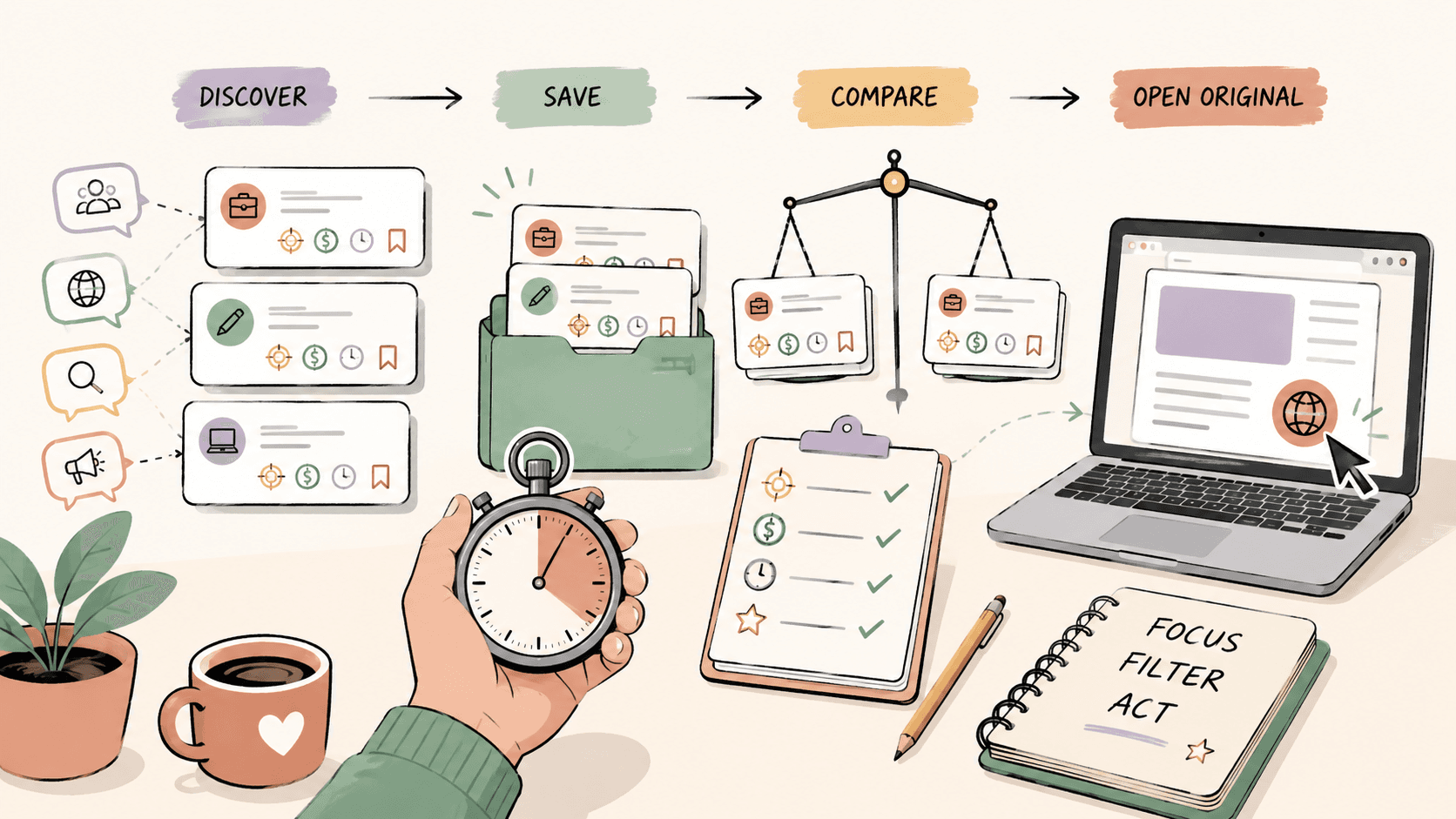
Why most people waste time searching for paid projects?
Time waste happens at three stages:
- Browsing without focus. You open every platform with no filter and no goal, scrolling past irrelevant posts.
- Qualifying too late. You spend ten minutes reading a listing only to realize the budget is a tenth of your rate.
- Losing track. You saw a great opportunity two days ago but cannot remember which platform or thread it was on.
A structured approach fixes all three.
Step 1: Pick the right platforms
Not every platform is worth your time. Focus on the ones where clients actually post paid work and where the community culture supports direct outreach.
Reddit communities
Reddit is one of the best free sources for paid project leads because clients post openly and you can respond publicly or via DM.
Key subreddits to monitor:
- r/forhire — broad freelance and gig postings across writing, design, development, marketing, and more.
- r/designjobs — design-focused roles and project work.
- r/slavelabour — micro-tasks and small paid jobs, useful for building momentum or filling gaps.
- r/freelance — fewer direct job posts but useful for market intelligence and networking.
- r/programmingtasks — coding tasks and small development projects.
Check the subreddit rules before posting or DMing. Some communities restrict self-promotion or require specific flair.
Design and creative platforms
If you do visual work, these platforms combine portfolio presence with active opportunity feeds:
- Dribbble — has a jobs board and freelance project listings.
- Behance — Adobe's creative community with a jobs section.
- 99designs — contest-based but can lead to ongoing client relationships.
General freelance marketplaces
- Upwork — large volume of paid projects but high competition and platform fees.
- Contra — commission-free freelance platform with project listings.
- Wellfound (formerly AngelList Talent) — startup roles and contract work.
The goal is not to be everywhere. Pick two to three sources that match your skills and check them consistently.
See fresh gigs on Sidequestboard
Step 2: Set a daily search routine
Random browsing kills productivity. Instead, set a fixed window, ideally 20 to 30 minutes, once or twice a day.
A simple routine:
- Morning (15 minutes): Check your chosen subreddits and platforms sorted by new posts.
- Midday (10 minutes): Scan for any responses to your applications or pitches.
- Evening (5 minutes): Save any interesting opportunities you did not have time to fully evaluate.
Sorting by new is critical. On Reddit especially, the best opportunities get buried within hours. If you only check the top posts, you are already too late.
Step 3: Qualify leads fast
Most listings are not worth your time. Before you invest effort in a proposal, run a quick qualification check.
Red flags that waste your time
- Vague scope with no deliverables described.
- Budget described as "small" or "simple" with no number attached.
- Demands for free samples or unpaid trials.
- Poor communication in the listing itself.
- Unrealistic timelines.
Green flags worth pursuing
- Clear deliverables and scope.
- Stated budget, even if it is a range.
- Professional tone and realistic expectations.
- Evidence the client has hired before or has a posting history.
Rate benchmarks to keep in mind
Rate expectations vary widely by niche, experience level, and geography. The figures below are general reference points for common freelance categories. Always verify current market rates before quoting.
- Logo design: $200–$2,000+ depending on scope and client type.
- Blog writing (1,000–1,500 words): $75–$300+ depending on expertise required.
- Web development (small project or landing page): $500–$5,000+ depending on complexity.
- Social media management (monthly retainer): $500–$3,000+ depending on platform count and scope.
Use these as sanity checks, not fixed prices. If a listing offers $50 for a full brand identity, move on.
Step 4: Respond faster without lowering quality
Speed matters. On platforms like Reddit, the first five to ten responses have a significant advantage. But speed should not mean sloppy.
A strong first response has three parts:
- Acknowledge the specific need. Reference one or two details from the listing.
- Show relevant proof. Link to one piece of work that directly relates to their problem.
- Ask one clear question. This keeps the conversation moving.
Example for a Reddit post requesting a landing page design:
Hi, I saw you need a landing page for your SaaS launch. I recently designed a similar page for [project], which increased signups by [result]. Would you like to see a quick mockup idea or discuss the scope first?
Keep it short. Clients skim.
Step 5: Track opportunities so nothing slips through
If you cannot remember where you saw a listing, whether you applied, or what the client said, you are losing paid work to disorganization.
At minimum, use a simple spreadsheet with columns for:
- Platform
- Client name or username
- Project description
- Budget
- Date discovered
- Status (saved, applied, responded, rejected)
- Link to original post
This takes 30 seconds per opportunity and saves hours of confusion later.
How Sidequestboard helps you discover paid projects faster?
Sidequestboard is built specifically for this problem. It is a discovery dashboard that pulls fresh opportunity posts from public communities and social platforms into one cleaner feed, so you spend less time searching and more time applying.
Instead of juggling tabs across Reddit, X, Discord, and other sources, Sidequestboard lets you:
- Browse fresh public opportunities in one place.
- Save interesting leads for later.
- Open the original listing to apply or respond directly.
- Reduce the noise of unrelated posts.
It does not replace the platforms where clients post. It replaces the chaotic manual browsing that eats your day.
If you are currently losing an hour or more daily just scanning for opportunities, Sidequestboard gives you that time back.
Common mistakes that kill your project pipeline
Even with a good system, a few habits will quietly destroy your results:
- Applying to everything. Shotgun applications lower your quality and burn you out.
- Ignoring follow-ups. A polite nudge after three days often wins the project.
- Only checking top posts. The best opportunities are often buried in new.
- No portfolio link. If a client cannot see your work in one click, they will move on.
- Giving up after a dry week. Pipelines take consistency. Show up daily, even briefly.
A simple weekly review to improve your hit rate
Every week, spend 15 minutes reviewing your tracked opportunities:
- Which platforms produced the best leads?
- Which types of projects matched your skills and rates?
- Which responses got replies and which got ignored?
Double down on what worked. Stop checking platforms that produced nothing after two to three weeks of consistent effort.
Start finding paid projects with less wasted time
The goal is not to search more. It is to search smarter. Pick your platforms, set a routine, qualify fast, respond well, and track everything.
If you want a calmer way to discover fresh opportunities without the tab chaos, try Sidequestboard free for 7 days and see how much time you reclaim.