August 13, 2026
How to Identify Paid Projects from Community Posts
To identify paid projects from community posts, look for clear buyer intent: budget, scope, deadline, deliverables, decision maker, and response instructions. Prioritize fresh posts from specific sources like r/forhire, r/designjobs, Dribbble Jobs, and Behance Joblist, then verify the poster before pitching.
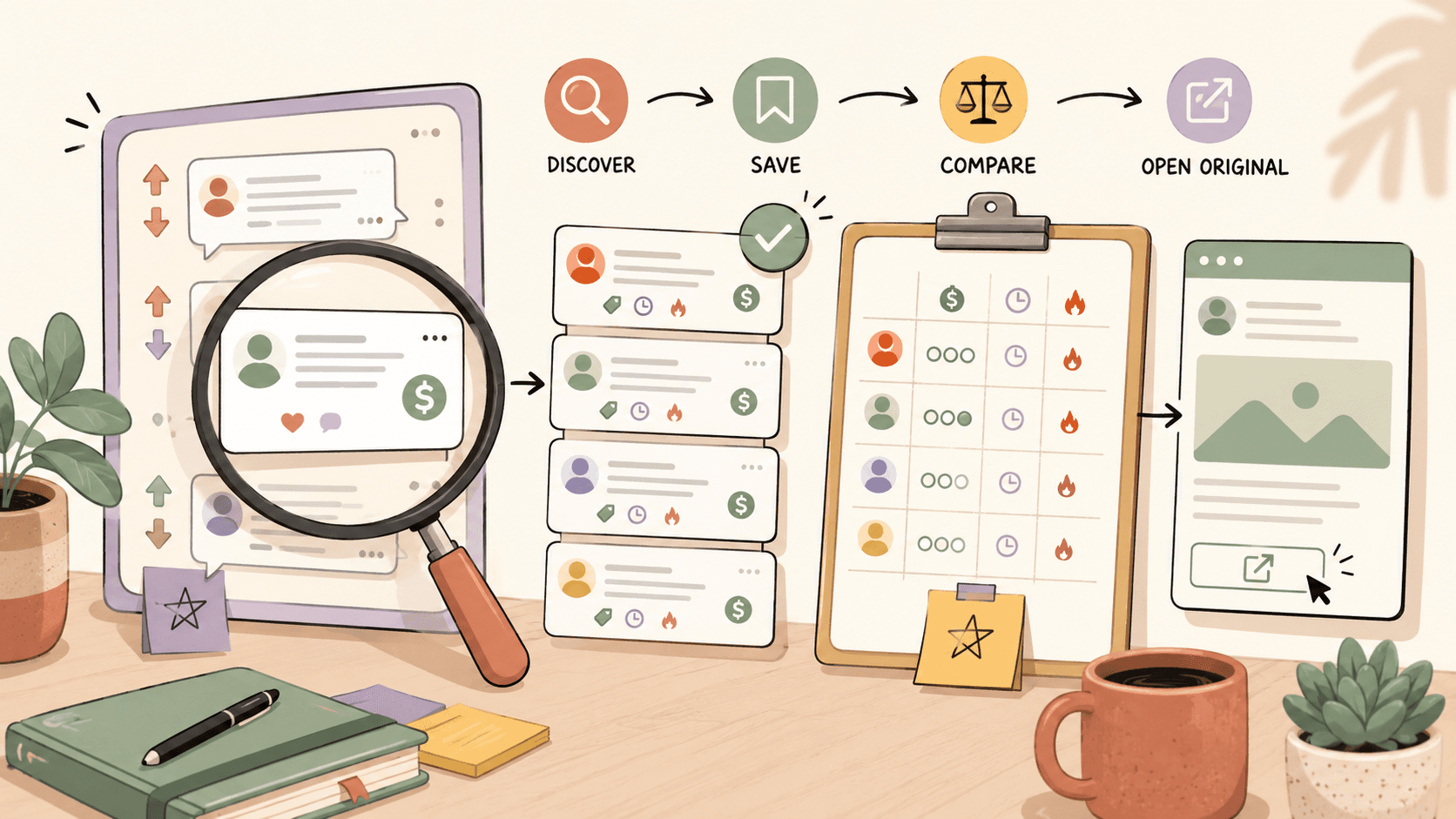
What makes a community post look like a real paid project?
A real paid project post usually includes five signals: a specific task, a budget or rate, a timeline, proof that the poster can make a decision, and clear instructions for how to respond.
On r/forhire, which has about 1.3M members, the strongest posts often use the [Hiring] tag and describe what the person needs built, designed, written, edited, or fixed. For design work, search terms like “designer”, “design”, “logo”, “UI”, or “illustration” inside [Hiring] posts. You are looking for language like:
- “Hiring a UI designer for a SaaS landing page”
- “Need logo and brand kit for a local business”
- “Looking for an illustrator for 6 product drawings”
- “Budget is $800”
- “Please send portfolio and availability”
On r/designjobs, which has about 150K members, the signal is even cleaner because the community is already focused on design opportunities. Check the [Hiring] flair first. A post that says “Need a logo for a coffee brand, $500 budget, due in two weeks, send portfolio” is much more actionable than “Any designers here?”
The simplest test: if you cannot tell what the buyer wants, when they need it, and how they want to be contacted, treat it as a weak lead until clarified.
Action: Open r/forhire, search designer inside [Hiring] posts, sort by New, and save only posts with scope, budget, timeline, and reply instructions.
Which words signal buyer intent in Reddit and design communities?
Certain words reveal whether someone is browsing, recruiting opinions, or actively trying to pay for work. On r/forhire and r/designjobs, the best buyer-intent phrases are direct and operational:
- “Hiring”
- “Need someone to”
- “Looking for a designer”
- “Paid project”
- “Budget”
- “Rate”
- “Deadline”
- “Portfolio required”
- “Send examples”
- “Start this week”
- “Remote”
- “Contract”
Weak signals are usually vague or exploratory:
- “Thinking about starting a brand”
- “How much would this cost?”
- “Anyone know a designer?”
- “Might need help later”
- “Looking for feedback”
Those weak posts are not useless. In r/Design, which has about 400K members, discussion threads can produce relationship-based leads, especially if someone is asking about packaging, landing pages, brand systems, or illustration styles. But you should treat those as networking opportunities, not immediate paid projects. A thoughtful comment can lead to a private conversation, but it should not outrank a clear [Hiring] post with a budget.
For example, if someone in r/Design posts, “I’m stuck choosing a visual direction for my new app,” you might reply with one useful observation and a portfolio link only if it fits the thread rules. That is different from pitching aggressively. If the person says, “We’re hiring a UI designer for this,” then it becomes a lead.
Action: Build a keyword list with hiring, budget, deadline, portfolio, paid, contract, logo, UI, illustration, then search those terms in r/forhire and r/designjobs.
Browse today’s opportunities on Sidequestboard
How do you verify that a community project is legitimate?
Before replying, check whether the post has enough trust signals. Community work moves fast, but speed should not replace verification.
On Reddit, click the poster’s profile. Look for account age, comment history, previous hiring posts, and whether they interact normally outside the opportunity post. A brand-new account is not automatically fake, but it needs more caution. If the budget is unusually high with almost no detail, ask clarifying questions before sharing extensive unpaid ideas.
Use these checks:
- Account history: Has the poster commented in relevant communities before, such as r/forhire, r/designjobs, or r/Design?
- Specificity: Does the post name deliverables, like “3 logo concepts and final vector files,” instead of just “branding help”?
- Budget realism: Does the budget match the work? A full UI redesign for $50 is not realistic if UI design normally runs $50 to $150/hr.
- Payment terms: Does the poster mention hourly, fixed fee, milestone, or contract terms?
- External identity: If they link a company website, LinkedIn profile, Dribbble profile, or Behance profile, does it look consistent?
- No unpaid spec trap: Are they asking for a complete custom sample before payment? That is a warning sign.
A practical example: say you find a post on r/forhire titled “Hiring graphic designer for social ads.” The poster offers $300 for a batch of ad graphics. Graphic design commonly ranges from $30 to $100/hr, so $300 could be reasonable if the scope is 3 to 6 simple assets, not a full campaign strategy. Before replying, check whether they specify formats, number of revisions, brand assets, and deadline. If not, your response should ask those questions instead of blindly accepting.
Action: Before sending any pitch, spend two minutes checking account history, scope, budget fit, and whether the post asks for unpaid custom work.
How should you compare Reddit posts with Dribbble, Behance, and 99designs?
Community posts and structured job boards behave differently. You should use each source for a different type of opportunity.
r/forhire is broad and fast. It has 1.3M members, so you will see many categories, including design, development, writing, marketing, admin work, and one-off tasks. The advantage is freshness. The downside is noise.
r/designjobs is more targeted. With 150K members, it is smaller than r/forhire but cleaner for design-specific work. Start with [Hiring] flair and ignore posts that do not show budget or deliverables.
r/Design is better for networking and lead discovery through discussions. It has about 400K members, but it is not mainly a paid-project board. Use it to spot people with active design problems, then contribute carefully.
Dribbble Jobs at https://dribbble.com/jobs is useful for UI/UX, graphic design, and illustration roles. It is free to browse. Posts there tend to be more formal than Reddit posts, so you can compare the role description, company identity, and portfolio expectations before applying.
Behance Joblist at https://behance.net/joblist focuses on creative design roles and is also free to browse. Because Behance is portfolio-centered, your project presentation matters. A strong case study can outperform a generic resume.
99designs at https://99designs.com is different because it is built around logo and branding design contests, with commission varying by contest. Use it carefully. Contests can help newer designers practice positioning, but they may require work before you know whether you will be paid. Compare that against direct project leads where the buyer already has a budget.
Here is a simple ranking method:
- Need fresh one-off freelance work? Check r/forhire and r/designjobs first.
- Need formal design roles? Check Dribbble Jobs and Behance Joblist.
- Want portfolio exposure or contest-style branding work? Review 99designs, but watch the contest terms.
- Want relationship-based leads? Participate in r/Design discussions without spamming.
Action: Put r/forhire, r/designjobs, Dribbble Jobs, Behance Joblist, and 99designs into a daily rotation, but spend the most time on the sources that match your service.
What does a good paid-project walkthrough look like?
Here is a realistic walkthrough for finding and qualifying a design project from a community post.
Open r/forhire and search “designer”. Filter for [Hiring] posts and sort by New. You find a post from three hours ago: “Hiring a logo designer for a fitness coaching brand, $600 budget, need final files within 10 days.”
That post has several strong signals. The service is clear: logo design. The budget is visible: $600, which sits inside the normal $200 to $2,000+ logo design range. The timeline is clear: 10 days. The deliverable is implied, but you should clarify final file types like SVG, PNG, PDF, and source files.
Before replying, check the poster’s profile. They have a six-year-old account, previous comments in small business and fitness communities, and no obvious spam pattern. That is a decent trust signal. Now write a short response:
“Hey, I design logos and brand systems for small service businesses. Your $600 budget and 10-day timeline are workable if the scope is logo plus basic color/type direction. Here are 3 relevant examples: [portfolio links]. A couple quick questions: do you need vector source files, social profile versions, and usage guidelines? I’m available to start Thursday.”
That reply works because it reflects the actual post. It does not dump a generic bio. It confirms budget fit, asks scope questions, and makes the next step easy.
Now compare that to a weak post: “Need someone creative for a brand, DM me.” No budget, no timeline, no deliverables, no context. You can still respond, but keep it short: “Happy to take a look. What deliverables do you need, what budget range are you working with, and when do you need it completed?” If they avoid those questions, move on.
Action: Use a two-reply system: detailed pitch for clear paid posts, short qualification question for vague posts.
How can designers spot underpaid projects before wasting time?
The fastest way to avoid bad leads is to compare the posted budget against the actual work category.
Use these benchmarks from common design work:
- Logo design: $200 to $2,000+
- UI design: $50 to $150/hr
- Graphic design: $30 to $100/hr
- Illustration: $50 to $500+ per illustration
If someone wants a full app UI, design system, clickable prototype, and revisions for $150, that is not a serious UI project. Even at the low end of $50/hr, $150 covers only about three hours. A more realistic small UI task might be one landing page section, a quick wireframe cleanup, or a single screen redesign.
For illustration, a request for “20 custom illustrations for $100” should fail your filter immediately. Since illustration often ranges from $50 to $500+ per illustration, that budget only makes sense for very simple icons or licensed stock-style assets, not custom commercial artwork.
For graphic design, a $250 post could be fine if the scope is a flyer and a few social graphics. It is not fine if the buyer expects a full brand identity, ad campaign, packaging, and unlimited revisions.
When you see a mismatch, you have three options:
- Pass silently.
- Reply with a reduced scope: “For $300, I can do 4 ad graphics using your existing brand assets.”
- Quote your real rate and explain the difference.
The second option often works best because it respects the buyer’s budget without discounting your entire service.
Action: Save the rate ranges above in a note and check every project against them before you reply.
How do you organize community leads without drowning in tabs?
A simple lead-tracking system beats memory. You can use Notion, Trello, or a spreadsheet, but the fields matter more than the tool.
Track these columns:
- Source: r/forhire, r/designjobs, Dribbble Jobs, Behance Joblist, 99designs, r/Design
- Post URL
- Posted time
- Role or project type
- Budget or rate
- Deadline
- Buyer intent score from 1 to 5
- Verification notes
- Response sent: yes/no
- Follow-up date
- Outcome
A buyer intent score keeps you honest. Give a post 5/5 if it has budget, scope, timeline, decision maker, and response instructions. Give it 3/5 if it has scope but no budget. Give it 1/5 if it is just a vague discussion.
Here is a daily workflow I would use for a freelance designer:
- 9:00 AM: Check r/forhire [Hiring] posts for “design,” “logo,” and “UI.”
- 9:15 AM: Check r/designjobs [Hiring] flair.
- 9:25 AM: Review Dribbble Jobs for UI/UX or illustration roles.
- 9:35 AM: Review Behance Joblist for creative roles.
- 9:45 AM: Add the best leads to Notion or Trello.
- 10:00 AM: Send 3 customized responses.
The key is to separate discovery from responding. If you keep searching while writing pitches, you will lose time to tab switching and half-qualified posts.
This is also where Sidequestboard can help if your main pain is checking too many public communities and social platforms. It gives you a calmer feed for fresh public opportunities, lets you save interesting posts, and sends you back to the original source so you can apply, pitch, or respond directly. It is not a replacement for judgment, but it can reduce the tab chaos around discovery.
Action: Create a lead tracker today with the columns above, then limit discovery to 45 minutes before writing any replies.
When should you respond quickly, and when should you wait?
Freshness matters most when the project is simple, popular, and easy for many people to fulfill. A $500 logo post on r/forhire may attract many replies within a few hours. A niche UI/UX role on Dribbble Jobs may stay relevant longer because the buyer needs a more specific portfolio fit.
Use this timing rule:
- Respond within 1 to 3 hours for clear Reddit [Hiring] posts with budget and simple deliverables.
- Respond same day for r/designjobs posts that match your portfolio closely.
- Respond within 24 hours for Dribbble Jobs and Behance Joblist roles, unless the post says urgent.
- Do not rush vague posts until the buyer answers basic budget and scope questions.
Speed helps only if your response is relevant. A fast generic pitch usually loses to a slower specific one. If the post asks for illustration samples, send illustration samples, not your full homepage. If the project is UI design, link to a UI case study and mention your hourly range if appropriate, such as “My UI project rate is based on $75/hr depending on scope.”
For 99designs, timing works differently because contests have set windows and commission varies by contest. Before entering, check the contest brief, prize, number of existing entries, and whether the client has given feedback. A contest with 200 entries and no buyer feedback is usually a poor use of time.
Action: Set a response window for each source, and do not spend more than 10 minutes evaluating any single weak lead.
How can Sidequestboard fit into this workflow?
Once you know how to judge buyer intent, the next bottleneck is usually discovery. Checking r/forhire, r/designjobs, r/Design, Dribbble Jobs, Behance Joblist, 99designs, X/Twitter, Discord communities, and other public sources can eat the same hour you wanted to spend pitching.
Sidequestboard is built for people who monitor public communities and social platforms for fresh work opportunities. It helps you discover relevant posts in one cleaner feed, save the ones worth reviewing, open the original listing, and respond at the source. That keeps your workflow simple: scan, save, verify, pitch.
Use it after you already have your filtering criteria. For example, if you only want logo projects above $500, UI design work around $50 to $150/hr, or illustration projects above $100 per piece, keep using the same buyer-intent checklist. The tool helps you find and organize opportunities faster, but you still decide which posts deserve your time.
A good combined workflow looks like this:
- Scan fresh public opportunities in Sidequestboard.
- Save anything with clear scope, budget, and timeline.
- Open the original post.
- Verify the poster or company.
- Respond directly with a tailored pitch.
- Track follow-up in your Notion, Trello, or spreadsheet.
Action: If tab switching is slowing you down, try using one feed for discovery and reserve your best energy for qualification and replies.
What should your first reply include?
Your first reply should prove that you read the post and can solve the specific problem. Keep it short enough to scan.
Use this structure:
- One sentence confirming the project fit.
- One sentence with relevant proof.
- One sentence about budget, timeline, or availability.
- Two or three links to matching work.
- One clear next question.
Example for r/designjobs:
“Hi, I’m interested in the landing page redesign you posted under [Hiring]. I’ve designed SaaS and creator-product pages, including these examples: [link], [link]. Your timeline works for me, and my UI design work usually falls in the $50 to $150/hr range depending on scope. Do you already have wireframes and copy, or would those need to be included?”
Example for Behance Joblist:
“Hi, I saw your creative design role on Behance Joblist and noticed you need campaign visuals with a strong portfolio presentation. My relevant work is here: [case study]. I can send a tighter sample set if you are focused on social, display, or brand assets.”
Avoid sending long biographies, unrelated portfolios, or “Dear Sir/Madam” templates. Community leads are often won by relevance and timing.
Action: Save a reusable pitch skeleton, but rewrite the first two lines for every post.
What is the simplest checklist for identifying paid projects?
Use this checklist before you spend time on any community post:
- Is the source specific, such as r/forhire, r/designjobs, Dribbble Jobs, Behance Joblist, 99designs, or r/Design?
- Is the post fresh enough to respond to?
- Does it include a real task or deliverable?
- Does the budget match normal rates, such as $200 to $2,000+ for logo design or $50 to $150/hr for UI design?
- Is there a deadline or start date?
- Does the poster say how to respond?
- Can you verify the poster’s history, company, or profile?
- Are they avoiding unpaid custom work?
- Do you have a relevant portfolio example?
- Can you reply in under 10 minutes with a tailored message?
If a post passes at least seven of these checks, it is probably worth a response. If it passes fewer than five, qualify it with one short question or skip it.
Paid projects are not hidden in one perfect place. They show up across public communities, design boards, and discussion threads. The advantage goes to the person who can identify buyer intent quickly, verify the lead, and respond with relevant proof before the post goes cold.
Action: Use the checklist on your next 10 posts and track which signals lead to actual replies.