August 8, 2026
How to Organize Contract Opportunities in Less Time: A 45-Minute Daily Workflow
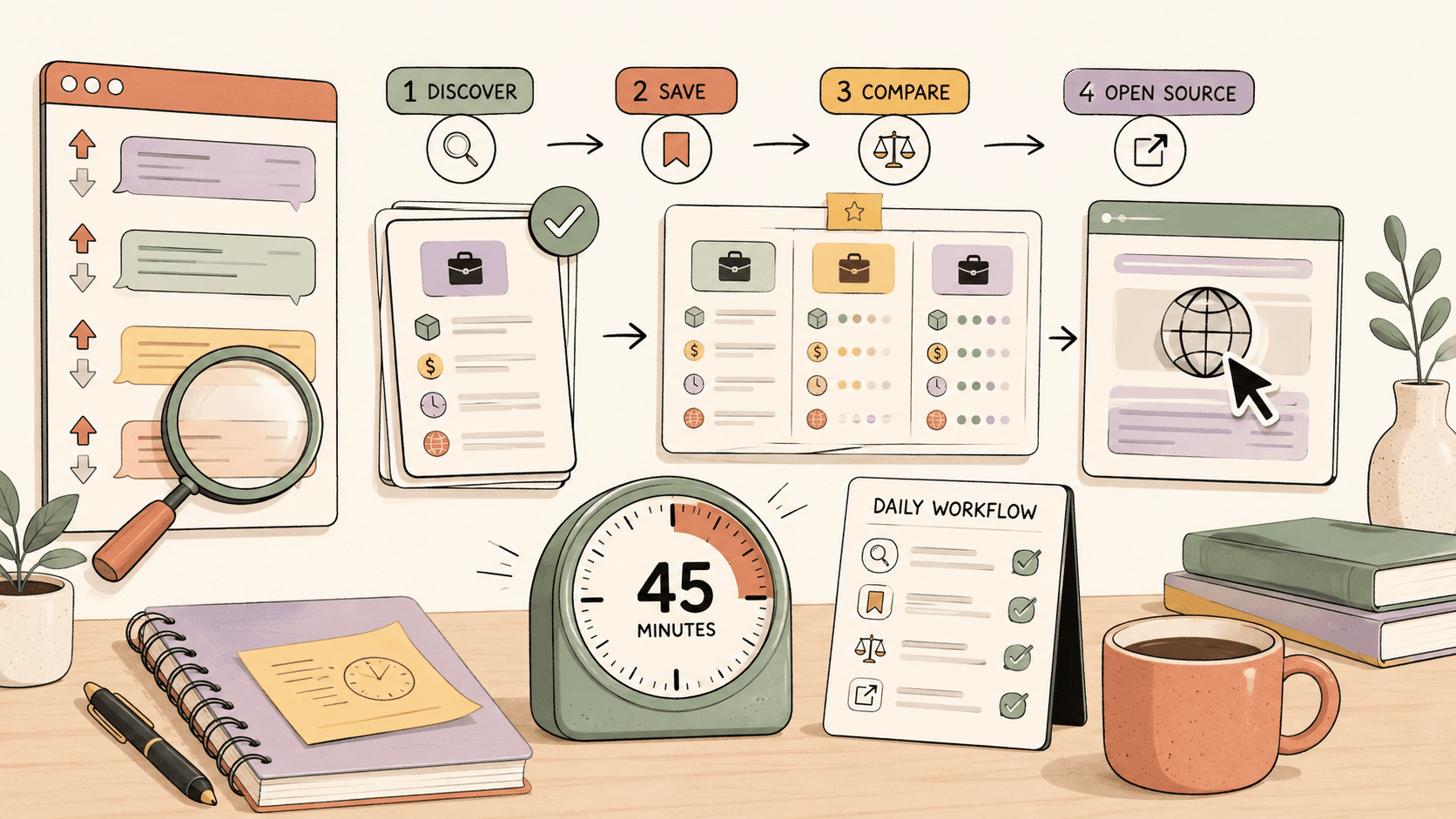
To organize contract opportunities faster, use one tracker, scan fewer high-signal sources, sort by freshness, save only leads worth acting on, and respond within 24 hours when possible. A simple 45-minute daily workflow helps you replace scattered tabs with a repeatable system for finding, prioritizing, and following up on contract work.
The faster way to organize contract opportunities
Contract opportunities disappear quickly. A useful Reddit post can get dozens of replies in a few hours. A freelance marketplace brief can close before you finish comparing tabs. A niche community lead can get buried under unrelated chat.
The answer is not to check more places. The answer is to build a small, repeatable system that helps you decide quickly:
- Is this opportunity relevant?
- Is it fresh enough to pursue?
- Do I know what to send?
- Have I already followed up?
This guide gives you a practical 45-minute daily workflow for organizing contract opportunities from public communities, freelance platforms, job boards, and social feeds.
The 45-minute workflow checklist
Use this as your default daily routine:
- 5 minutes: Open your tracker and review yesterday’s saved opportunities.
- 15 minutes: Scan your highest-signal sources for fresh posts only.
- 10 minutes: Save and score the best leads using a simple priority system.
- 10 minutes: Send replies or applications to the top opportunities.
- 5 minutes: Update statuses so nothing gets lost.
If you have more time, spend it applying or improving your pitch, not endlessly searching.
See fresh gigs on Sidequestboard
What should you track for each contract opportunity?
Your tracker should capture only the information that helps you make a decision. Too many fields slow you down.
Use these columns:
| Field | Why it matters |
|---|---|
| Opportunity title | Helps you recognize the lead quickly |
| Source | Reddit, Upwork, Fiverr, Contra, niche community, referral, etc. |
| Original link | Lets you return to the exact post or listing |
| Posted date or freshness | Helps you prioritize recent opportunities |
| Client or poster name | Useful for personalization and follow-up |
| Skill fit | Measures how closely the work matches your services |
| Budget or rate note | Helps you decide whether it is worth pursuing |
| Deadline or urgency | Helps you prioritize time-sensitive leads |
| Status | Saved, applied, replied, follow-up, rejected, won, lost |
| Next action | Keeps the opportunity moving |
A Google Sheet, Notion database, Trello board, Airtable base, or simple CRM can all work. The tool matters less than consistency.
Which sources should you scan first?
Start with a small number of sources that consistently produce relevant leads for your niche. More sources usually means more noise.
Common places to monitor include:
- Reddit communities such as r/forhire, r/HireaWriter, r/WorkOnline, r/designjobs, and niche subreddits related to your skill
- Freelance marketplaces such as Upwork, Fiverr, Contra, PeoplePerHour, and Toptal
- Public Slack, Discord, and community job channels when accessible
- X/Twitter searches for phrases like “looking for a freelance designer” or “need a React developer”
- Niche job boards for your field
- Creator, startup, and indie founder communities
- Past client referrals and warm networks
Avoid relying on platform details that change often. Fees, visibility rules, application limits, and marketplace policies can shift, so check each platform’s official help pages before pricing work or deciding where to focus.
How do you decide which opportunities are worth saving?
Use a fast scoring system instead of saving everything.
Score each lead from 1 to 3 in four areas:
- Fit: Does the project match your core service?
- Freshness: Was it posted recently enough that a reply still has a chance?
- Budget clarity: Is there enough information to judge whether it is viable?
- Response angle: Can you write a specific, useful reply quickly?
A simple scorecard:
| Score | Meaning |
|---|---|
| 10-12 | Apply or reply today |
| 7-9 | Save and review if time allows |
| 4-6 | Only pursue if highly strategic |
| 1-3 | Skip |
This keeps your tracker clean. A smaller list of strong leads is more valuable than a giant backlog of weak possibilities.
How can you avoid wasting time in too many tabs?
Set source limits before you start searching.
For example:
- Pick 3 primary sources you check daily.
- Pick 3 secondary sources you check twice per week.
- Mute or remove sources that repeatedly produce low-fit leads.
- Stop scanning when your 15-minute discovery block ends.
This is where a discovery dashboard can help. Sidequestboard gives opportunity seekers a calmer feed for fresh public opportunities, so you can reduce manual tab-checking, save relevant leads, open the original source, and respond directly where the opportunity was posted.
What statuses should your opportunity tracker use?
A good status system prevents leads from becoming a messy list of links.
Use these statuses:
- New: Found but not reviewed yet
- Saved: Worth considering
- Ready to reply: Strong fit and enough detail to act
- Applied/replied: You have sent a message, proposal, or application
- Follow up: You should check back or send a follow-up
- Won: You got the contract
- Lost: Closed, rejected, or no longer worth pursuing
- Archived: Not relevant now, but useful for future reference
Review “ready to reply” and “follow up” every day. Review “saved” two or three times per week. Archive aggressively.
How should you prioritize fresh opportunities?
Freshness matters because many contract opportunities are informal, fast-moving, and competitive.
A practical rule:
- Posted today: Highest priority if the fit is strong
- Posted yesterday: Still worth pursuing if you can send a specific reply
- Posted 2-3 days ago: Pursue only if the post is specialized or has low visible competition
- Older than that: Usually lower priority unless the listing says it is still open
Do not chase every old post. Your time is better spent replying quickly to relevant leads and building a better pipeline for tomorrow.
What should your reply template include?
A good first reply should be short, specific, and easy for the client to respond to.
Use this structure:
- Reference the exact problem or project.
- State your relevant experience in one sentence.
- Suggest a concrete next step.
- Include one proof point or portfolio link if appropriate.
Example:
Hi [Name], I saw your post about needing help with [specific project]. I’ve worked on similar [type of project] before, especially [relevant detail]. I can help with [specific outcome] and could start by [first step]. Here’s a relevant example: [link]. Would you like me to send a quick plan or estimate?
Avoid sending the same generic pitch everywhere. A slightly slower but more specific reply usually beats a copied message.
Example workflow for a front-end developer
A front-end developer might scan:
- r/forhire
- Startup communities
- Upwork or Contra listings
- X/Twitter searches for “need React developer” or “frontend freelancer”
Their tracker tags might include:
- React
- Next.js
- Landing page
- Dashboard
- Bug fix
- Design-to-code
- Urgent
A high-priority lead could be a recent post from a founder who needs a landing page fixed before launch. The developer can reply quickly with a relevant example, a short diagnosis, and a proposed first step.
Example workflow for a freelance designer
A designer might scan:
- r/designjobs
- Indie founder communities
- Creator communities
- Contra or portfolio-based platforms
- Public posts asking for brand, landing page, or pitch deck help
Their tracker tags might include:
- Brand identity
- Web design
- Deck design
- UI audit
- Figma
- Startup
- Creator
A strong lead is not just “someone needs design.” It is a post where the client has a clear problem, realistic scope, and a reason to act soon.
Example workflow for a writer or content marketer
A writer might scan:
- r/HireaWriter
- Marketing communities
- Startup job boards
- Founder posts looking for case studies, landing pages, newsletters, or SEO content
- Freelance marketplaces with writing categories
Their tracker tags might include:
- Case study
- Blog
- Landing page
- Email sequence
- Technical writing
- SaaS
- Founder-led content
Rates vary widely by skill, niche, geography, urgency, client type, and scope. Treat any rate examples you see online as directional, not definitive. Before accepting work, clarify deliverables, revision limits, usage rights, payment terms, and deadlines.
How often should you clean your opportunity list?
Clean your tracker at least once per week.
During your weekly review:
- Archive old leads you will not pursue.
- Move unanswered replies to follow-up if appropriate.
- Review which sources produced the best opportunities.
- Remove sources that created noise but no action.
- Update your templates based on replies that worked.
The goal is not to maintain a perfect database. The goal is to keep your next action obvious.
What mistakes slow down contract opportunity tracking?
The most common mistakes are:
- Saving every possible lead instead of only strong ones
- Spending more time searching than replying
- Forgetting to record the original link
- Tracking too many fields
- Applying to stale posts before fresh ones
- Ignoring follow-ups
- Using generic pitches that do not reference the project
- Failing to verify current platform rules and fees before pricing work
A good system should make the right action easier, not create administrative work.
A simple weekly review template
At the end of each week, answer these questions:
- Which source produced the most relevant leads?
- Which source wasted the most time?
- How many opportunities did I save?
- How many did I actually reply to?
- Which replies got responses?
- What should I stop checking next week?
- What template or portfolio link should I improve?
If your saved opportunities are growing but your replies are not, your system is too search-heavy. Reduce discovery time and increase response time.
Where Sidequestboard fits in the workflow?
Sidequestboard works best as the discovery layer in this system. Instead of opening a long list of public communities and social platforms every morning, you can use one cleaner feed to find fresh public opportunities, save the ones worth reviewing, then open the original source to apply or respond directly.
It does not replace your judgment, portfolio, pricing, or follow-up process. It simply helps reduce the tab chaos so more of your time goes into acting on relevant opportunities.
Final takeaway
To organize contract opportunities in less time, build a repeatable workflow:
- Scan fewer sources.
- Prioritize fresh posts.
- Save only decision-worthy leads.
- Track status and next action.
- Reply quickly with specific messages.
- Review your sources weekly.
The faster you can move from “I found something” to “I sent a strong reply,” the better your opportunity pipeline becomes.