July 8, 2026
How to Find Job Leads as a Beginner Without Refreshing 20 Tabs
Beginners find job leads faster by choosing a few niche sources, sorting by newest posts, using role-specific search terms, saving only relevant opportunities, and replying with proof quickly. Use a simple tracker or dashboard so you spend less time hunting and more time applying, pitching, or following up.
What is the fastest way to find job leads as a beginner?
The fastest beginner-friendly method is:
- Pick one clear role or service you can offer.
- Choose 5 to 8 lead sources that match that role.
- Check them on a fixed schedule, preferably daily.
- Sort by newest posts instead of most popular posts.
- Save only leads that match your skills, availability, and location or remote preference.
- Reply with a short message that includes proof, a next step, and a low-friction way to talk.
- Track every lead so you can follow up instead of starting over each day.
Most beginners lose time because they search randomly. A beginner with a small focused lead list often beats someone with 50 tabs and no system.
Where should beginners look for job leads?
Start with sources where people already post work, project requests, hiring needs, or collaboration opportunities. The best sources depend on your role.
| Beginner role | Places to check | Search terms to try |
|---|---|---|
| Designer or illustrator | r/forhire, r/designjobs, Dribbble Jobs, Behance Joblist, design communities, portfolio platforms | hiring designer, logo designer needed, illustrator needed, UI designer contract, freelance designer |
| Writer or editor | Writing job boards, relevant subreddits, newsletter communities, creator communities, startup communities | freelance writer, content writer needed, blog writer, copywriter contract, editor needed |
| Junior developer | GitHub communities, indie maker communities, startup communities, relevant Discords, X/Twitter searches, remote job boards | junior developer, frontend help, build MVP, contract developer, React freelancer |
| Virtual assistant | Remote work communities, founder communities, small business groups, VA-focused groups, Reddit searches | virtual assistant, admin help, operations assistant, VA needed, part-time assistant |
| Marketer or social media beginner | Indie Hackers-style communities, startup groups, creator communities, social media job boards, public posts | social media help, marketing assistant, email marketing, growth intern, content repurposing |
| Customer support or operations | Remote job boards, startup job boards, community posts, founder communities | customer support, support specialist, community manager, operations assistant, remote support |
You do not need all of these. Pick the sources that fit your role and ignore the rest.
Track fresh opportunities on Sidequestboard
How do you choose the right job lead sources?
Use this simple filter before adding any source to your routine:
- Relevance: Are people posting the type of work you can actually do?
- Freshness: Are new posts appearing often enough to justify checking?
- Signal quality: Are posts specific, or mostly spam and vague requests?
- Response path: Is it clear how to apply, reply, email, DM, or open the original listing?
- Beginner accessibility: Are there occasional entry-level, junior, small project, internship, or beginner-friendly posts?
A small source with high-quality posts can be more useful than a huge platform full of irrelevant listings.
Also, do not rely on outdated platform descriptions, subreddit member counts, or old pay estimates. Community sizes, platform rules, job-board availability, and compensation ranges change. Before publishing a major application campaign around a source, verify details on the official platform or community page.
How should beginners search Reddit for job leads?
Reddit can be useful because many people post direct requests, freelance needs, collaboration calls, and hiring threads. It can also be noisy, so use it carefully.
Begin with communities that match your role. Examples include broad work communities like r/forhire and more niche communities for design, development, writing, marketing, or remote work. Always read each subreddit’s rules before posting or replying.
A simple Reddit workflow:
- Search your role plus hiring words, such as
designer needed,writer needed,junior developer, orvirtual assistant. - Sort by new or use recent time filters where available.
- Open only posts with clear scope, budget, timeline, or application instructions.
- Avoid posts that ask for unpaid work, vague “exposure,” or suspicious payment arrangements.
- Save the post URL, poster name, date, and status in your tracker.
- Reply or DM only if the community rules allow it.
Example search patterns:
site:reddit.com/r/forhire "designer" "hiring"site:reddit.com "virtual assistant" "needed"site:reddit.com "freelance writer" "looking for"site:reddit.com "React developer" "contract"
Reddit leads can disappear quickly because many people reply to the same post. Freshness matters, but so does quality. Do not rush into a bad-fit project just because it is new.
How can designers and creative beginners find leads?
Designers, illustrators, UI designers, motion designers, and other creative beginners often have more public lead sources than they realize.
Useful places to check may include:
- r/forhire and role-specific subreddits
- r/designjobs or other design hiring communities, if active and relevant
- Dribbble Jobs or Dribbble hiring pages, if available in your region and role
- Behance Joblist or Behance project opportunities, if available
- 99designs and other contest or freelance platforms
- Design Discords, Slack groups, newsletters, and creator communities
- Public posts from founders, agencies, indie makers, and creators
When using portfolio platforms, do not only browse pretty work. Look for hiring signals:
- “We are hiring” posts
- Studio expansion announcements
- Founders asking for help with branding, landing pages, pitch decks, or product UI
- Agencies mentioning overflow work
- Job board posts connected to portfolio communities
For 99designs or contest-style platforms, read the terms carefully. Some beginners use these platforms to practice, build confidence, or find early clients, but contests can be competitive and not every effort is paid. Verify platform rules, fees, rights, and payout terms directly on the official site before investing significant time.
How can non-design beginners find leads?
If you are not a designer, use the same system but change your sources and keywords.
Writers and editors
Look for leads where businesses already ask for content help:
- Writing job boards
- Creator newsletters
- Startup communities
- Marketing communities
- Relevant subreddits
- Public posts from founders and agencies
Search for phrases like:
freelance writer neededcontent writer contractcopywriter for landing pageblog writer needededitor needed
Your proof can be 2 to 3 writing samples, a short portfolio page, or a Google Doc with before-and-after edits.
Junior developers
Junior developers can search beyond standard job boards. Many small teams post small technical needs in public communities before creating a formal job listing.
Try sources like:
- Indie maker communities
- Startup communities
- GitHub-related communities
- Relevant Discord groups
- X/Twitter searches
- Remote job boards
Search for:
frontend help neededbuild MVPReact freelancerWebflow developerShopify developer neededjunior developer remote
For proof, link to a small live project, GitHub repo, case study, or short Loom walkthrough if appropriate.
Virtual assistants and operations beginners
VA and operations leads often come from founders, creators, coaches, agencies, and small businesses that are overwhelmed.
Search for:
virtual assistant neededadmin assistant remoteoperations helppart-time assistantinbox managementcalendar management
Your proof can be a one-page service menu, a short list of tools you know, and examples of organized workflows you can manage.
Marketers and social media beginners
Beginner marketers can look for small scoped work before applying for large full-time roles.
Search for:
social media assistantcontent repurposingemail marketing helpTikTok editor needednewsletter assistantmarketing intern remote
Proof can include sample posts, a mini audit, a content calendar example, or a short explanation of how you would improve one specific account or campaign.
How do you know if a lead is worth replying to?
Use a simple lead score before spending time on an application.
Give each lead 0 to 2 points for each category:
- Fit: Does it match your skill level and service?
- Freshness: Was it posted recently enough that a reply may still be seen?
- Clarity: Does the post explain the task, budget, scope, or timeline?
- Proof match: Do you have a sample, project, or story that proves you can help?
- Safety: Does the opportunity look legitimate and reasonable?
A lead that scores 8 to 10 is worth a fast tailored reply. A lead that scores 5 to 7 may be worth saving for later. A lead below 5 usually should be skipped.
Beginner mistake: replying to every lead. Better approach: reply to fewer leads with better proof.
What should a beginner job lead tracker include?
Use a spreadsheet, Notion table, Airtable, or a saved-opportunity dashboard. The tool matters less than consistency.
Track these fields:
| Field | Why it matters |
|---|---|
| Date found | Helps you know what is fresh |
| Source | Shows which platforms actually produce leads |
| Original URL | Lets you verify and apply at the source |
| Role or project type | Helps you spot patterns |
| Fit score | Prevents random applications |
| Status | Saved, replied, followed up, rejected, won |
| Contact method | Email, form, DM, comment, application page |
| Proof used | Portfolio link, case study, sample, resume |
| Follow-up date | Prevents missed opportunities |
| Notes | Captures requirements, budget, or red flags |
After two weeks, review your tracker. Keep sources that produce relevant leads. Remove sources that waste time.
What should beginners say when responding to a lead?
A beginner response should be short, specific, and proof-based. Do not send a generic “I’m interested” message.
Use this structure:
- Mention the role or project.
- Show that you understood the need.
- Include one relevant proof link.
- State your availability or next step.
- Ask one simple question or suggest a short call.
Template for freelance or project leads
Hi [Name], I saw your post about [specific project].

I can help with [specific outcome]. I’ve worked on / built / written / designed something similar here: [proof link].

If useful, I can start with [small first step] and share a quick plan by [timeframe].

Is [specific detail] the main priority for this project?
Template for junior job applications
Hi [Name], I found your post for [role].

I’m early in my career, but I’ve been building experience in [skill area]. This project/sample is most relevant: [proof link].

I’m especially interested because [specific reason tied to the company or role].

Would you be open to reviewing my application or pointing me to the best next step?
Template for community replies
This sounds like a fit. I’ve done [specific relevant thing], and here’s a quick example: [link].

If you’re still looking, I can help with [specific first task] and send a short plan.
Keep your first message easy to answer. The goal is not to tell your life story. The goal is to start a relevant conversation.
How many job leads should a beginner check each day?
A useful beginner target is not a fixed number of websites. It is a fixed amount of focused time.
Try this 45-minute daily workflow:
- 10 minutes: Check your highest-signal sources sorted by newest.
- 10 minutes: Save and score the best-fit opportunities.
- 15 minutes: Send 1 to 3 tailored replies or applications.
- 5 minutes: Update your tracker.
- 5 minutes: Follow up on older leads when appropriate.
If you have more time, spend it improving proof: portfolio pieces, case studies, resume bullets, samples, or short project walkthroughs. Better proof improves every reply you send.
How can Sidequestboard fit into this workflow?
Sidequestboard is built for people who monitor public communities and social platforms for fresh work opportunities but do not want to manually refresh too many tabs.
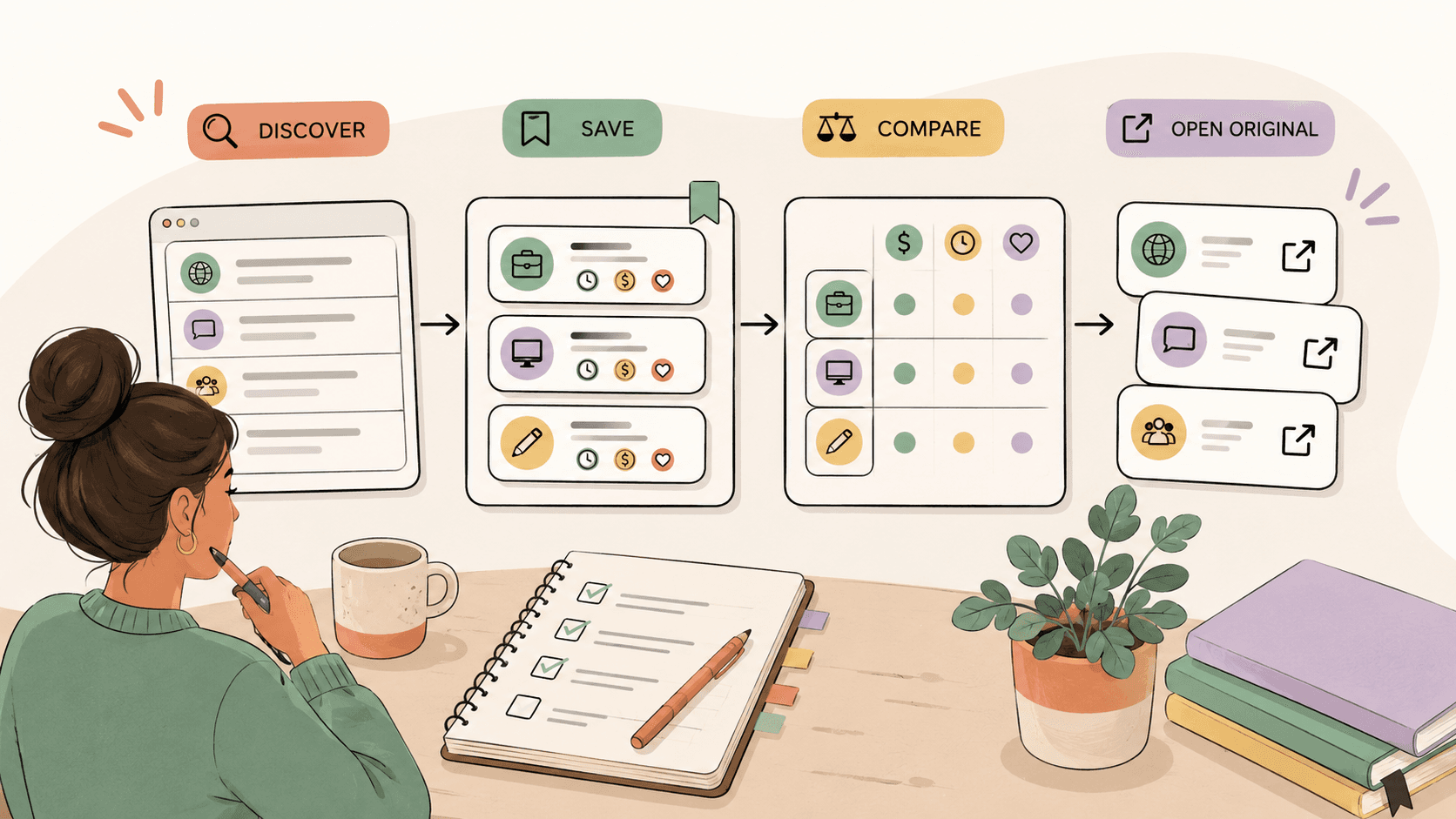
Instead of starting your lead review by opening every source separately, you can use Sidequestboard as a calmer discovery dashboard to:
- scan fresh public opportunity posts in one cleaner feed,
- save interesting leads for review,
- reduce tab switching across communities and social platforms,
- open the original source when you are ready to apply or respond,
- draft faster first replies when appropriate.
Sidequestboard is not a recruiter, not a guaranteed job source, and not a replacement for applying directly. You should still read the original post, check the instructions, verify details, and respond through the correct source. Availability of specific sources can vary, so always open and verify the original post before responding.
A practical way to use it:
- Open Sidequestboard at the start of your 45-minute lead review.
- Scan fresh opportunities that match your role.
- Save the best-fit posts.
- Open the original listing or source.
- Reply using a proof-based message.
- Track the status in your lead tracker.
The benefit is not that you stop doing the work. The benefit is that you spend less of your work session searching and more of it responding to relevant opportunities.
What red flags should beginners avoid?
Be careful with any lead that includes:
- requests for free work with no clear paid path,
- vague promises of “exposure,”
- unclear payment terms,
- pressure to move money, buy equipment, or pay upfront fees,
- suspicious links or files,
- unrealistic timelines,
- no clear company, person, or project details,
- requests that violate platform rules.
If something feels wrong, verify it. Search the company or person, check the original post, read platform rules, and avoid sharing sensitive information too early.
A simple weekly beginner lead plan
Use this plan for two weeks before changing everything.
Monday
Set your target role and update your proof links. Choose your 5 to 8 sources.
Tuesday to Thursday
Run the 45-minute lead review. Save, score, reply, and track.
Friday
Follow up on earlier replies. Review which sources produced real opportunities.
Weekend
Improve one proof asset: portfolio page, resume, case study, writing sample, project demo, or service page.
After two weeks, ask:
- Which sources had the most relevant leads?
- Which keywords worked?
- Which replies got responses?
- Which proof links were easiest to send?
- Which sources should I remove?
This is how beginners move from random searching to a repeatable job lead system.
Final takeaway
Beginners do not need a huge network or dozens of open tabs to find job leads. They need a clear role, a focused source list, fresh searches, a simple tracker, and proof-based replies.
Start small. Check fewer places more consistently. Save the right leads. Respond quickly. Improve your proof every week. Over time, your lead workflow becomes less chaotic and much easier to repeat.
Related guides
- How to Compare Remote Work Leads from Reddit Communities
- How to Organize Remote Job Leads from Multiple Websites Without Tab Chaos
- How to Create a Shortlist of Freelance Gigs Worth Pitching
- How to Track Freelance Clients from Reddit Communities
- Remove Saved Searches on Upwork: Delete Searches, Saved Jobs, and Alerts