June 19, 2026
Does Indeed Verify Job Listings Before They Go Live? The Honest Answer Plus a Smarter Job Search Workflow
No — Indeed does not manually verify every job listing before it goes live. It relies on automated screening, employer account checks, and user reports, which means some questionable or outdated posts slip through until flagged. Treat every listing as unverified until you check it yourself, and use Indeed for discovery rather than as your entire job search.
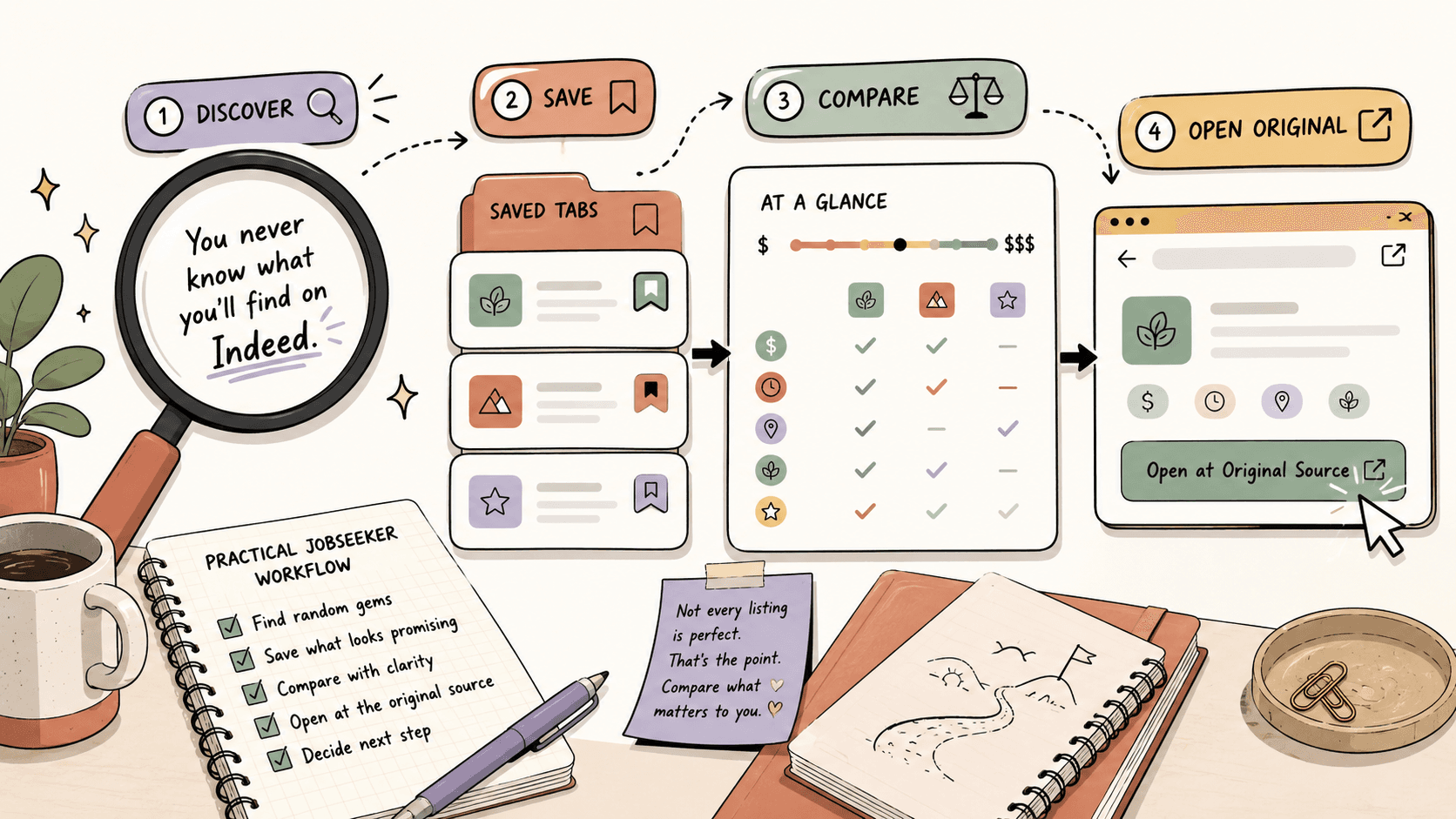
Does Indeed verify every job listing before it goes live on the site?
The short answer is no, and it helps to understand why. Indeed aggregates millions of postings from direct employers, staffing agencies, job boards, and company career pages. Reviewing every single submission by hand before publication would be impractical at that scale, so Indeed's moderation model works in layers instead:
- Automated screening: Systems scan postings for patterns commonly associated with fraud or policy violations, such as suspicious links, unusual formatting, or known scam templates.
- Employer account checks: Employers posting jobs go through account-level validation, which raises the barrier for bad actors but does not confirm that every individual job description is accurate, current, or honest.
- Community reporting: Much of the actual cleanup happens after publication. Users report suspicious listings, and posts that get flagged may be reviewed and removed.
This model catches a lot, but it has a clear weakness: a posting that passes the automated filters can stay live until enough people report it. In practice, that means a scam or a long-dead listing can sit in your search results for days or weeks. When you see a job that looks off, you are not imagining it — you are seeing the gap between automated moderation and true verification.
It also explains why some listings carry a "flagged" notice or disappear mid-search: that is usually the reporting system catching up, not a pre-publication check that failed late. The practical takeaway is simple: treat Indeed as a discovery channel where listings are unverified until proven otherwise, and build a quick verification habit before you apply.
How can you verify any Indeed listing in 60 seconds?
Before you spend 30 minutes tailoring a resume, run this fast four-point check:
- Identify the poster. Is it a direct employer, a staffing agency, or an unclear third party? Vague posters get extra scrutiny.
- Cross-check the company's careers page. Search the company name, find its official site, and confirm the same role exists there with matching details.
- Check the recruiter's domain. A legitimate contact usually has an email and LinkedIn presence tied to the company's real domain, not a generic address.
- Scan for red flags. Requests for payment, banking details, or identity documents before a formal process are immediate disqualifiers.
If a listing passes all four, it is worth deeper research. If it fails even one, slow down or skip it. Once you have a few verified leads, keep them in one tracker instead of scattered browser tabs — a simple spreadsheet or a tool like Sidequestboard works, because the whole point is that verified leads should never get lost in the noise again.
Track fresh opportunities on Sidequestboard
Why does Indeed feel so random in the first place?
Large job boards collect postings from many sources. That scale is helpful for discovery, but it also means quality varies wildly — especially because, as we covered above, postings are not individually pre-verified.
You may run into:
- listings with vague job descriptions,
- roles reposted by staffing agencies,
- jobs that are no longer active on the company website,
- titles that do not match the responsibilities,
- pay ranges that are missing or hard to compare,
- remote roles that include location restrictions,
- entry-level titles asking for advanced experience,
- contract or commission-heavy roles mixed into full-time searches.
None of this means every odd-looking listing is fraudulent. It means you need a filter before you spend real time on an application.
Step 1: Scan the listing for basic fit before clicking apply
Before researching deeply, do a fast pass. Look for:
- Employer name: direct employer, staffing firm, or unclear poster?
- Role type: full-time, part-time, contract, freelance, temporary, commission-based, internship, or volunteer?
- Location rules: remote, hybrid, on-site, country-specific, state-specific, or time-zone-specific?
- Pay details: is compensation listed? If not, is the role still worth investigating?
- Responsibilities: specific enough to understand the actual work?
- Requirements: do they match the title and seniority?
- Application path: does it send you to the employer's official site or keep everything inside the job board?
If a listing fails the obvious-fit test, skip it. Your time is part of the cost of applying.
Step 2: Verify the job on the company's official site
For promising listings, search for the company directly and check its careers page. This is one of the simplest ways to avoid wasting time on outdated or low-quality posts.
A practical verification flow:
- Copy the company name from the listing.
- Search for the company's official website.
- Find its careers, jobs, or hiring page.
- Search for the same job title or location.
- Compare the description, pay range, location, and application deadline if available.
- Apply through the official company page when possible, unless the listing clearly directs you elsewhere.
If the job is not on the company website, that does not automatically make it fake. Some employers use third-party applicant tracking systems or staffing partners. But it should make you slow down and verify more carefully before sending personal information.
Step 3: Check the employer, recruiter, and domain details
A job listing is more trustworthy when the employer identity is clear and consistent. Before applying, check:
- Does the company have a real website, and does the domain match the company name?
- Does the recruiter's email use a company domain rather than a generic address?
- Does the company have a LinkedIn page or other public presence?
- Do employee names, job titles, and hiring posts appear consistent across sources?
- Are you being asked for unusual personal or financial information early?
Be especially careful if a supposed employer asks for payment, banking details, identity documents, or equipment purchases before a formal hiring process. When in doubt, verify through the company's official contact channel.
Step 4: Compare the pay before you apply
If the listing includes compensation, compare it with reputable salary or labor-market sources. Useful places to compare pay include:
- official labor statistics sources in your country,
- salary comparison sites,
- industry-specific compensation databases,
- public job listings for similar roles,
- professional communities where people discuss rates,
- freelance marketplaces for project-based pricing signals.
Do not rely on one number. Pay varies by location, seniority, company size, employment type, and benefits. The point is to understand whether the listing is roughly realistic before you spend time customizing an application.
Step 5: Save only the leads that pass your filter
A noisy job search becomes worse when every listing lives in a browser tab. Create a simple tracking system with columns such as: role title, company or client, source, original listing URL, date found, deadline, pay or rate, status, next action, and notes.
Statuses can be simple: saved, verified, applied, followed up, rejected, closed, not a fit. This prevents the common loop of finding the same listing again, wondering whether you applied, and losing time to repeated research.
Step 6: Build a daily search routine instead of endless scrolling
A better job-search workflow has a start and stop point:
- Spend 15–20 minutes checking major job boards such as Indeed.
- Verify only the roles that pass your first scan.
- Save the best leads in one tracker.
- Check public communities and niche boards for fresher opportunities.
- Prioritize applications or replies for the best-fit leads.
- Stop searching and switch to applying, pitching, or follow-up.
The key is to separate finding from responding. If you mix them all day, you can feel busy without making progress.
What should you do if you already applied to a suspicious listing?
It happens to almost everyone eventually. If you applied to a posting that now looks questionable, act quickly:
- Report the listing on Indeed. Use the report or flag option on the posting so the moderation team can review it and protect other jobseekers.
- Stop sharing further information. If the "employer" asks for banking details, copies of ID, payment for equipment, or a move to private messaging, cut off the conversation.
- Contact the real company through its official channel. Find the company's website independently and ask whether the role and the recruiter are genuine.
- Watch for follow-up phishing. Text-only interviews, generic email domains, and pressure to decide immediately are classic post-application tactics.
- Withdraw if needed. If you applied through Indeed, you can often remove or close your application from your account.
If you shared sensitive data, monitor your accounts and consider a credit alert. One suspicious application is recoverable; the goal is to limit exposure.
When should you stop scrolling Indeed and check other opportunity feeds?
Move beyond Indeed when:
- you keep seeing the same reposted roles,
- the listings are too broad for your niche,
- you are looking for freelance, contract, or project-based work,
- you need fresher opportunities than large boards surface,
- you are already checking Reddit, X/Twitter, Discord, and niche communities manually,
- you spend more time searching than applying.
Public communities can surface opportunities that never become polished job-board listings: freelance gigs, small-business help requests, creator roles, startup projects, and contract work. The tradeoff is that these sources are scattered, and you can waste just as much time jumping between tabs as you do on a noisy job board.
Where does Sidequestboard fit in this workflow?
Sidequestboard is useful when your job search includes public communities and social platforms, not just traditional job boards. It helps opportunity seekers:
- discover freelance, job, and opportunity posts from public sources in one cleaner feed,
- avoid manually checking too many tabs and communities,
- find relevant opportunities while they are still fresh,
- save interesting leads,
- open the original source to apply or respond directly,
- draft faster first replies when appropriate.
You can still use Indeed for broad searches, but use Sidequestboard to monitor fresher public opportunity posts without building your morning around tab-hopping.
A practical morning workflow for jobseekers and freelancers
1. Start with your target list
Write down what you are actually looking for: target role or service, preferred work type, remote or location requirements, minimum pay, industries you want and want to avoid, keywords that signal a good fit, and red flags that mean instant skip. This prevents every interesting-looking post from becoming a distraction.
2. Check major job boards quickly
Use Indeed or other job boards for structured search. Filter by role, location, remote status, and date posted. Do not open every listing — only the ones that pass your first scan.
3. Verify high-potential listings
For each promising listing: check the employer website, confirm the role exists if possible, compare key details, search the company and recruiter, and decide whether to apply directly through the official source.
4. Check fresh public opportunities
After the large boards, check public feeds where smaller or faster-moving opportunities appear. This is where Sidequestboard can reduce the number of tabs you need to monitor.
5. Save, rank, and respond
Rank opportunities by fit and urgency:
- A: strong fit, fresh, clear next step,
- B: possible fit, needs more research,
- C: interesting but low priority,
- Skip: unclear, stale, underpaid, or irrelevant.
Apply or respond to A leads first, save B leads for later, and ignore the rest.
What makes a faster first reply?
For public opportunity posts, the first response matters because good leads get buried quickly. A concise reply should include the specific role, one sentence showing you understand the need, two or three proof points, a link to your portfolio or resume, and one clear next step:
Hi [Name], I saw your post about [specific need]. I've worked on [relevant example] and can help with [specific outcome]. Here are two relevant samples: [link] and [link]. If helpful, I can send a quick plan or jump on a short call this week.
Do not overcomplicate the first message. The goal is to be relevant, credible, and easy to respond to.
Which red flags deserve extra caution?
Slow down if a listing or opportunity includes:
- requests for payment to apply,
- pressure to move to encrypted or private messaging immediately,
- vague company identity,
- unrealistic pay for unclear work,
- no verifiable website or public presence,
- mismatched email domains,
- requests for sensitive documents before a legitimate hiring step,
- job descriptions copied across unrelated companies,
- interviews conducted only by text with no verifiable employer contact.
These signs do not prove fraud, but they justify more verification.
FAQ
Does Indeed verify every job listing before it goes live?
No. Indeed uses automated screening, employer account checks, and user reports to moderate postings, but it does not manually review every listing before publication. Some problematic or outdated posts can appear and remain live until reported, so verify listings yourself before applying.
Is Indeed still worth using for a job search?
Yes, Indeed can still be useful for discovering roles, but it works best as one source in a broader workflow. Verify promising listings on the employer's official site, compare details, and skip posts that are vague, stale, or clearly not a fit.
How do I know if an Indeed job listing is legitimate?
Check whether the company has an official website, whether the role appears on its careers page, whether the recruiter's contact details match the company domain, and whether the listing avoids suspicious requests such as payment, banking details, or sensitive documents too early.
Should I apply through Indeed or the company website?
When possible, applying through the company's official careers page is a good verification step because you confirm the role exists and submit directly to the employer's system. If the employer clearly uses Indeed as its application channel, follow the stated process but still verify the company first.
What should I do if a job post looks interesting but has no salary listed?
Decide whether the role justifies more research. Compare similar roles using reputable salary sources, public listings, and industry communities. If compensation is important to your decision, ask about the range early in the process.
How can Sidequestboard help if I already use Indeed?
Sidequestboard helps when you also monitor public communities and social platforms for work. It gives you a cleaner feed for fresh public posts, lets you save relevant leads, open the original source, and respond faster without checking many tabs manually.
The bottom line
Indeed can be part of a strong job search, but it should not be your entire job search — and it should never be treated as a pre-verified source of truth. Treat it as a discovery channel, verify listings before investing time, compare pay when possible, and track your best leads in one place. Then add fresher public opportunity sources to your routine, especially if you are a freelancer, solo builder, or jobseeker looking for online work. The less time you spend scrolling, the more time you can spend sending strong applications and timely replies.
Related guides
- How to Get Freelance Clients on LinkedIn: Profile, Search, Outreach, and Lead Workflow
- Best Side Hustle Ideas on Reddit for Finding Work
- How to Find Freelance Leads in Online Communities
- How to Find Job Opportunities in Reddit Communities
- Career Changes Are Not Easy in the U.S. Here Is How to Make One Less Risky