May 26, 2026
Where to Find Remote Jobs That Are Not Scams: 7 Legit Places and How to Verify Them
The safest places to find remote jobs are curated boards and trusted communities like FlexJobs, We Work Remotely, Remote.co, Wellfound, LinkedIn Jobs, and relevant subreddits. To avoid scams, verify the employer, read the listing carefully, ignore upfront payment requests, and apply only when the role includes a real company, scope, and next steps.
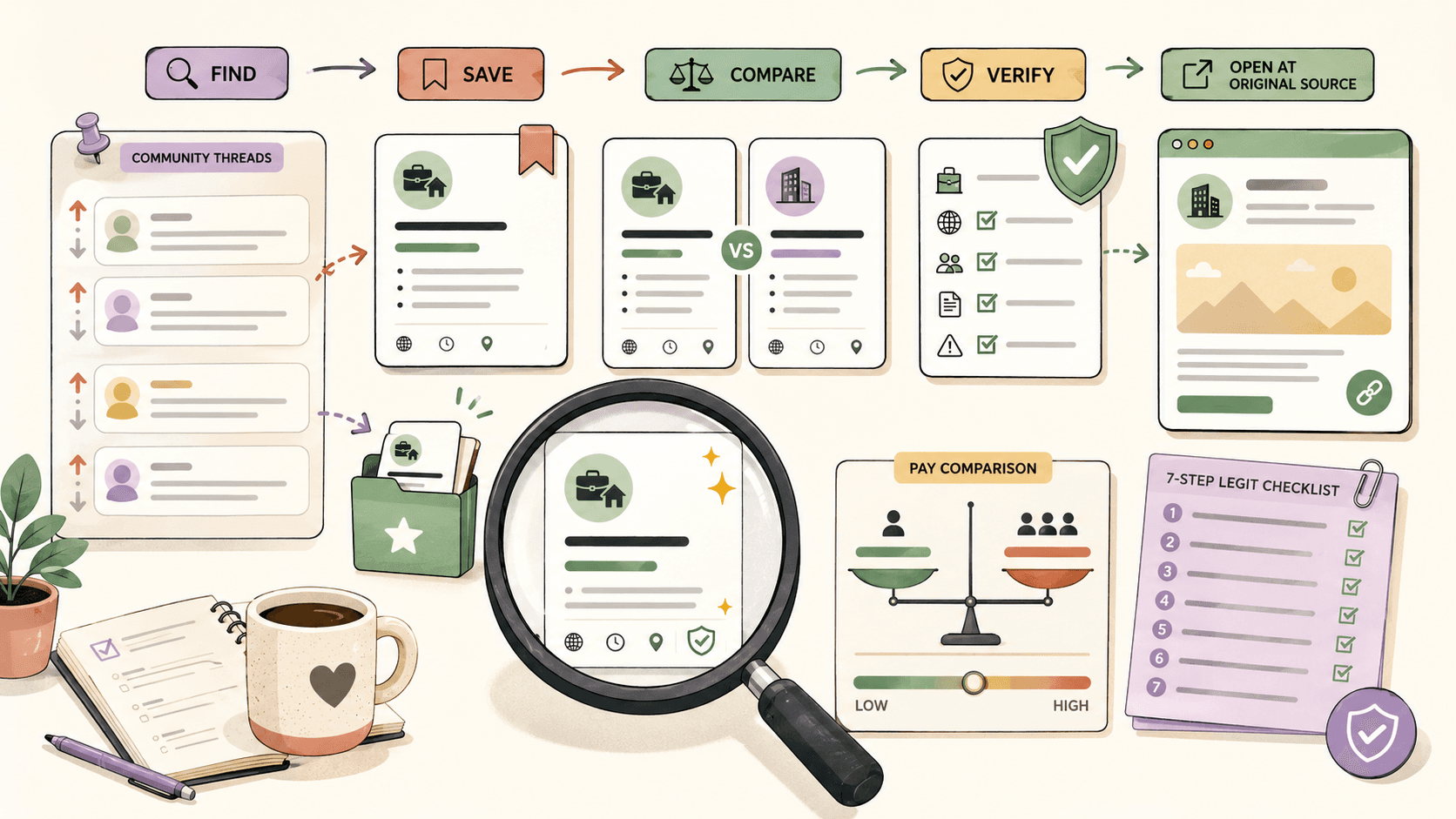
Which sites are safest for remote jobs?
There is no site that guarantees every listing is perfect, but some places are generally better starting points than random ads or unsolicited messages.
1) FlexJobs
FlexJobs is widely known as a curated job board. It is often recommended because it screens listings before they appear. If you use it, still verify the employer and role details yourself.
2) We Work Remotely
We Work Remotely is one of the best-known remote job boards. It is a strong place to look for remote-first roles across different functions.
3) Remote.co
Remote.co focuses on remote jobs and remote work resources. It is useful if you want a board that is centered on remote-first opportunities.
4) Wellfound
Wellfound is especially useful if you are open to startups. Many listings are remote or hybrid, but you should check the location, contract type, and compensation details carefully.
5) LinkedIn Jobs
LinkedIn Jobs can be very effective because you can check the employer profile, mutual connections, recent activity, and whether the company looks real. The downside is that the volume is high, so scam filtering matters more.
6) Reddit communities
Subreddits like r/RemoteJobs, r/digitalnomad, and r/cscareerquestions can surface opportunities quickly. The tradeoff is that you need to be extra careful because community posts are less consistently screened than curated boards.
7) Company career pages
If you already know the companies you want, apply directly through their career pages. This is one of the safest ways to avoid fake middlemen and suspicious reposts.
How do you spot a remote job scam fast?
Use this simple checklist before you apply:
- Check the employer name. A real company should be easy to find.
- Look for a clear role description. Vague tasks and no actual scope are red flags.
- Watch for pressure. Scammers often rush you to reply or hire you quickly.
- Never pay upfront. Legitimate employers do not usually ask for application fees, starter deposits, or equipment payments through strange channels.
- Verify the contact method. A real company email domain is more trustworthy than a random address.
- Compare the pay. If the salary is far above normal for the role, it deserves extra scrutiny.
A fast example
Suppose you see a listing for a remote customer support representative role.
In under five minutes, do this:
- Search the company name and confirm it has a real website.
- Open the careers page and see whether the same job is listed there.
- Check the recruiter or hiring contact on LinkedIn if one is provided.
- Compare the pay against similar customer support roles on a few other boards.
- Scan for red flags like payment requests, poor grammar, or a rushed hiring process.
If the listing fails more than one of those checks, skip it.
Browse today’s opportunities on Sidequestboard
How should you search remote job boards efficiently?
A simple workflow works better than endlessly scrolling.
Start with one category at a time
Pick one job type per session, such as:
- customer support
- software engineering
- design
- marketing
- operations
- writing
- project management
That keeps comparisons cleaner and helps you notice unrealistic pay or fake listings faster.
Sort by newest
Remote jobs move fast. Sorting by new or recent listings helps you reach real opportunities before they are buried.
Save only the strongest leads
Do not save everything. Save roles that meet your basic filters:
- real employer
- clear remote setup
- believable compensation
- application instructions that make sense
- a hiring path you can verify
What is the best way to use LinkedIn Jobs without wasting time?
LinkedIn Jobs is useful when you treat it like a verification tool, not just a feed.
A good workflow is:
- Search for the role you want.
- Filter for remote and the right experience level.
- Open the company page.
- Check whether the company has real activity, employees, and a believable presence.
- Save a few strong listings and apply only to the ones that pass your checks.
If a role looks good but the company looks thin or suspicious, move on.
How do communities like Reddit help without becoming a scam trap?
Community posts can surface jobs that never show up on big boards, especially contract work, startup roles, and niche opportunities.
The downside is obvious: anyone can post.
Use communities as a discovery layer, then verify the opportunity elsewhere before applying. If a Reddit post leads to a company name, use that name to check the official site, company profile, and application details.
Which remote job sources are best for beginners?
If you are new to remote job hunting, start with sources that make verification easier:
- curated boards with clearer screening
- LinkedIn Jobs for employer checks
- company career pages for direct applications
- a small number of trusted subreddits for fresh leads
That mix gives you both volume and safety without forcing you to chase every possible listing.
Where Sidequestboard fits into this workflow
If you are already checking LinkedIn, Reddit, and remote boards, the problem is usually not finding one good listing. It is keeping track of the good ones before they disappear.
Sidequestboard is useful for that part of the workflow: it gives you one cleaner feed for fresh public opportunities so you can save legit leads, revisit them later, and spend less time juggling tabs.
That makes it easier to move from browsing to acting, which matters when a remote role is new, competitive, or likely to fill quickly.
FAQ
Are remote jobs on LinkedIn real?
Many are real, but not all. LinkedIn is useful because you can verify the employer profile and company presence more easily than on some other sources. Still check the listing, the company, and the application path before you apply.
Is FlexJobs worth it for remote job seekers?
It can be worth checking because it is a curated board, but you should confirm current pricing and membership details on the official site before joining. The value depends on how often you apply and how much you want a screened board.
What is the biggest red flag in a remote job post?
Upfront payment requests are one of the biggest red flags. Other warning signs include vague job descriptions, unrealistic pay, rushed hiring, and weak company information.
Should I apply through a job board or the company website?
If the company has an official careers page, applying there is often safer. Job boards are still useful for discovery, but the company site helps you confirm that the role is real.
How many remote job sources should I check?
A small set is usually enough. For most people, one curated board, LinkedIn, one community source, and a few company career pages is a practical mix.