July 6, 2026
How to Spot Fake Remote Job Postings: A 5-Minute Scam Check
Fake remote jobs often request money, crypto, fake-check deposits, account access, remote-device control, or sensitive documents before you can verify the employer. In five minutes, check the company’s official careers page, compare the job and recruiter details, confirm the contact domain, and stop if anyone pressures you to act before verification.
What are the biggest signs of a fake remote job?
The strongest warning signs are requests for money, unusual payment instructions, unverifiable identities, and pressure to skip normal hiring steps.
Watch for these patterns:
- You must pay to apply, train, receive equipment, or unlock work. A request for an application fee, registration fee, gift card, cryptocurrency, or wire transfer is a serious warning sign.
- The employer sends a check and asks you to buy equipment or send money back. A deposited check can later be reversed, leaving you responsible for the money you spent or transferred.
- The recruiter uses a personal email address or a lookalike domain. Compare the sender’s domain with the company’s official website. Small changes in spelling can matter.
- The job promises unusually high pay for simple work. Compensation that seems disconnected from the duties, experience, or hours deserves independent verification.
- The process is entirely handled through chat apps. Chat-only interviews do not prove a scam, but refusing a verifiable company contact or normal interview process adds risk.
- You are asked for sensitive information too early. Be cautious if someone requests government identification, bank details, account passwords, or remote access before you have verified the employer and received a legitimate offer.
- The recruiter creates urgency. Statements such as “you must decide today” or “do not contact the company directly” are reasons to pause.
One warning sign may have an innocent explanation. Several together should end the conversation until you can verify the opportunity through sources you find yourself.
How do you verify a remote employer in five minutes?
Start outside the message or listing you received. Do not rely only on links, phone numbers, or contact details supplied by the recruiter.
Minute 1: Record the basic details
Copy the company name, job title, location or time-zone requirement, recruiter name, email domain, application URL, and any job or requisition number. Save a screenshot or the original URL before the listing changes.
Minute 2: Find the company yourself
Type the company name into a search engine or enter a web address you already know. Locate the official company website and its careers page. Do not use the careers link from the suspicious message until you have compared it with the official site.
Look for:
- The same job title and responsibilities
- A matching job or requisition number
- Consistent location, compensation, and application instructions
- A company email domain that matches the official website
If the job appears only on a third-party page and nowhere on the company’s official careers page, that does not automatically prove fraud. It does mean you should ask the company to confirm the opening through a public contact method.
Minute 3: Check the recruiter and communication channel
Search for the recruiter’s name on the company website and on LinkedIn. Compare their stated role, company affiliation, profile history, and contact domain. Be careful with copied profiles and newly created accounts.
Call or email the company using contact information obtained independently from its official website. Ask whether the job, recruiter, and hiring process are genuine. Do not use only the phone number or email address provided in the suspicious message.
Minute 4: Inspect the request
Write down what the person wants you to do next. Stop if the request involves sending money, depositing a check, buying gift cards, transferring cryptocurrency, sharing passwords, installing unknown software, or granting remote access to your device.
A legitimate employer may need information during a formal hiring or onboarding process, but you should understand why it is required and who is requesting it. Verify the employer first rather than sending documents because of a deadline.
Minute 5: Decide whether to proceed
If the details match and the company confirms the opportunity, continue through the company’s official process. If the details do not match, the contact refuses independent verification, or the pressure continues, stop communicating and report the listing through the platform where you found it.
Browse today’s opportunities on Sidequestboard
How do you check a suspicious LinkedIn job step by step?
Imagine you receive a LinkedIn message about a remote customer-support role. The recruiter says you were selected after a short chat and asks you to deposit a check for home-office equipment.
Use this walkthrough:
- Copy the employer name, job title, recruiter profile URL, and message details.
- Open a new browser tab and find the employer’s official website without using the message link.
- Search the official careers page for the job title and compare the description, location, and job number.
- Check whether the recruiter’s LinkedIn profile identifies the same employer and whether the email domain matches the company website.
- Contact the company through an independently found careers or general contact address and ask whether the recruiter and role are real.
- Do not deposit the check, purchase equipment, send money back, or provide bank credentials while verification is incomplete.
- Report the message and listing to LinkedIn if the details do not match, then block the account if appropriate.
The same method works on Indeed, Wellfound, Upwork, Reddit, and other communities: preserve the original details, find the employer independently, compare the information, and avoid financial or sensitive-data requests until the opportunity is verified. Platform presence is not a guarantee that a listing is safe.
Can a legitimate employer ask for money?
A legitimate employer should not require you to pay money to receive a job, release wages, purchase gift cards, or return part of a check. Requests involving cryptocurrency, wire transfers, or pressure to use your personal bank account are especially risky.
Do not assume a check has cleared simply because funds appear in your account. Contact your bank using an official number and explain what happened. Do not spend or transfer the money while the bank investigates.
What information should you protect during a remote job search?
Treat passwords, one-time verification codes, bank details, tax or government identification numbers, and full identity documents as sensitive. Avoid sending them through an unverified recruiter, form, or chat conversation.
Use a separate email address for applications if that helps you organize opportunities, enable multi-factor authentication on important accounts, and keep your operating system and security software updated. Never install remote-control software at a stranger’s direction unless you have independently verified the employer and understand exactly what access is being granted.
A resume can also reveal more than necessary. Consider whether it needs your full home address, personal identification numbers, or other details unrelated to the role.
What should you do after contacting a suspected job scammer?
Stop responding and preserve evidence, including messages, email headers, payment instructions, phone numbers, wallet addresses, profile URLs, and screenshots. Do not threaten the scammer or attempt to recover money by sending another payment.
If you shared a password, change it immediately anywhere it was reused and enable multi-factor authentication. If you shared financial information, contact your bank or payment provider using official contact details. If you installed software or granted remote access, disconnect the device from the internet and seek trusted technical help.
For U.S. reports, the Federal Trade Commission directs consumers to ReportFraud.ftc.gov, and IdentityTheft.gov provides recovery guidance for identity theft. The FBI’s Internet Crime Complaint Center, at ic3.gov, accepts reports about suspected internet crime. Also report the listing or account through the platform where you found it. Readers outside the United States should check their national consumer-protection or cybercrime reporting service.
How can you find opportunities without losing track of verification?
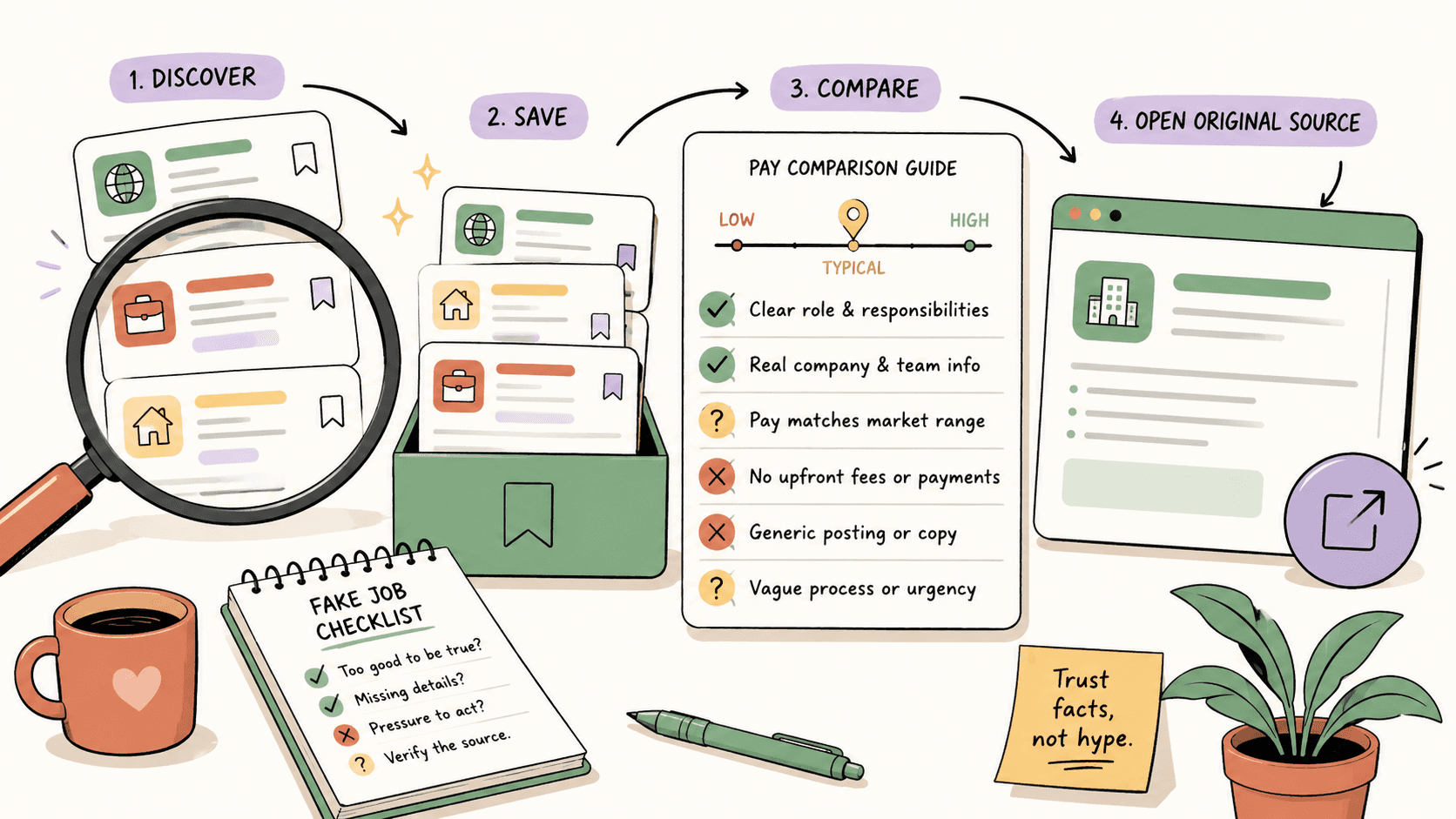
Safety checks are easier when you keep the original source, employer name, verification status, and follow-up date together. Instead of opening dozens of untracked tabs across public communities, you can use Sidequestboard to monitor public job and opportunity sources, save promising leads, and open the original listing before responding.
Sidequestboard does not guarantee that every opportunity is legitimate. Treat each saved lead as a starting point: verify the employer, compare the original source, and apply or respond through the appropriate official channel.
A simple pre-application checklist
Before you apply or share sensitive information, ask:
- Can I find the employer independently?
- Does the job appear on an official careers page or can the company confirm it publicly?
- Does the recruiter’s identity and email domain match the company?
- Is the hiring process clear and proportionate to the role?
- Has anyone requested money, cryptocurrency, a fake-check deposit, passwords, or remote access?
- Am I being pressured to act before I can verify the details?
- Do I know where to report the listing if something does not match?
If the answer to the last four questions raises concern, pause. A missed job is usually less costly than sending money or identity documents to an unverified contact.